
Why Enterprise Search Has Become a Business-Critical Capability
Most organizations don’t struggle with creating documents.
They struggle with finding them.
Every day, employees spend valuable time searching for:
- Contracts
- Financial reports
- Project documentation
- HR records
- Policies and procedures
- Technical specifications
- Customer communications
The challenge is not a lack of content.
The challenge is too much content spread across too many places.
Enterprise information now lives across:
- File servers
- NAS systems
- SharePoint environments
- Cloud storage
- Object storage
- Team collaboration platforms
- Department repositories
As content volumes grow, simply storing information is no longer enough.
If employees cannot quickly locate the information they need, content becomes a liability rather than an asset.
This is why enterprise search has evolved from a convenience feature into a core component of modern document management and digital workplace strategies.
The Hidden Cost of Poor Search
Most organizations underestimate how much time employees spend searching for information.
When content cannot be found quickly:
- Productivity declines
- Decisions take longer
- Duplicate work increases
- Collaboration slows
- Compliance risks grow
Employees often resort to workarounds such as:
- Saving local copies
- Creating duplicate documents
- Asking colleagues for files
- Recreating existing content
The result is even more content sprawl.
The irony is that organizations may already have the information they need—they simply cannot find it.
What Is Enterprise Search?
Enterprise search is the ability to locate content across multiple repositories through a unified search experience.
Unlike consumer search engines, enterprise search must do more than match keywords.
It must:
- Search structured and unstructured content
- Respect permissions
- Support metadata filtering
- Search inside documents
- Work across multiple repositories
- Protect sensitive information
A modern enterprise search solution helps users find the right document without needing to know exactly where it is stored.
Why Traditional Search Falls Short
Many organizations rely on basic search capabilities built into file systems or collaboration tools.
These approaches often create new challenges.
Search That Only Looks at File Names
Many search tools focus primarily on:
- File names
- Folder names
- Limited metadata
This works when users know exactly what they are looking for.
It fails when they remember only part of the document’s content.
Search Without Context
Traditional search often produces hundreds or thousands of results.
Without filtering, users must manually sift through large result sets.
This increases frustration and reduces efficiency.
Search That Ignores Permissions
Perhaps the biggest problem occurs when search engines reveal information users should not see.
Even displaying:
- File names
- Snippets
- Metadata
- Previews
can create security and compliance risks.
Enterprise search must solve all three challenges simultaneously.
Metadata Search: Finding Documents Through Context
One of the most powerful capabilities in enterprise search is metadata search.
What Is Metadata?
Metadata is information about a document rather than the document itself.
Examples include:
- Department
- Project
- Owner
- Classification
- Sensitivity level
- Document type
- Creation date
- Last modified date
Metadata adds business context to content.
Why Metadata Search Matters
Users often know information about a document without knowing its title.
For example:
- “It belongs to the finance department.”
- “It was created last quarter.”
- “It’s related to Project Falcon.”
- “It’s classified as confidential.”
Metadata search allows users to locate content using these attributes.
The Power of Faceted Search
Large result sets become manageable when users can filter content dynamically.
Faceted search enables users to narrow results based on:
- Department
- Owner
- Classification
- Date range
- File type
- Business unit
- Project
Instead of scrolling through hundreds of results, users quickly refine searches until only the most relevant content remains.
Metadata Search and Automated Classification
Many organizations worry that metadata search depends on manual tagging.
Modern document management platforms solve this challenge through automated classification.
Content can be tagged automatically based on:
- Content analysis
- Sensitivity
- Business rules
- Repository location
- Workflow context
This allows metadata search to remain effective even when users never manually classify documents.
Full-Text Search: Finding What the Document Actually Says
Metadata helps users find documents through context.
Full-text search helps users find documents through content.
What Is Full-Text Search?
Full-text search analyzes the actual text contained within documents.
Instead of searching only file names or metadata, users can search for:
- Words
- Phrases
- Sentences
- Specific terminology
This allows users to find documents even when they cannot remember the file name.
Why Full-Text Search Matters
Imagine an employee remembers a contract clause that includes the phrase:
“Termination for convenience.”
They may not remember:
- The contract name
- The folder location
- The project association
With full-text search, the phrase itself becomes the search query.
The document can be found immediately.
Combining Metadata and Full-Text Search
The most effective search experiences combine both approaches.
For example:
A user may search for:
“Quarterly forecast”
and then filter results to:
- Finance department
- Current fiscal year
- Confidential classification
This combination dramatically improves search precision.
Instead of thousands of results, users receive only the most relevant content.
Federated Search: One Search Across Multiple Repositories
One of the biggest challenges in modern enterprises is repository fragmentation.
Content may exist across:
- On-premises file servers
- NAS environments
- Cloud storage
- Collaboration platforms
- Departmental repositories
Users should not need to search each system individually.
What Is Federated Search?
Federated search creates a unified search experience across multiple repositories.
Employees perform one search and receive results from all connected systems.
This eliminates:
- Repository silos
- Duplicate searches
- Lost productivity
The result is a single point of discovery for enterprise content.
Security Trimming: The Most Important Search Feature Nobody Talks About
Finding content is important.
Finding content securely is even more important.
Search should never become a back door to sensitive information.
This is where security trimming becomes essential.
What Is Security Trimming?
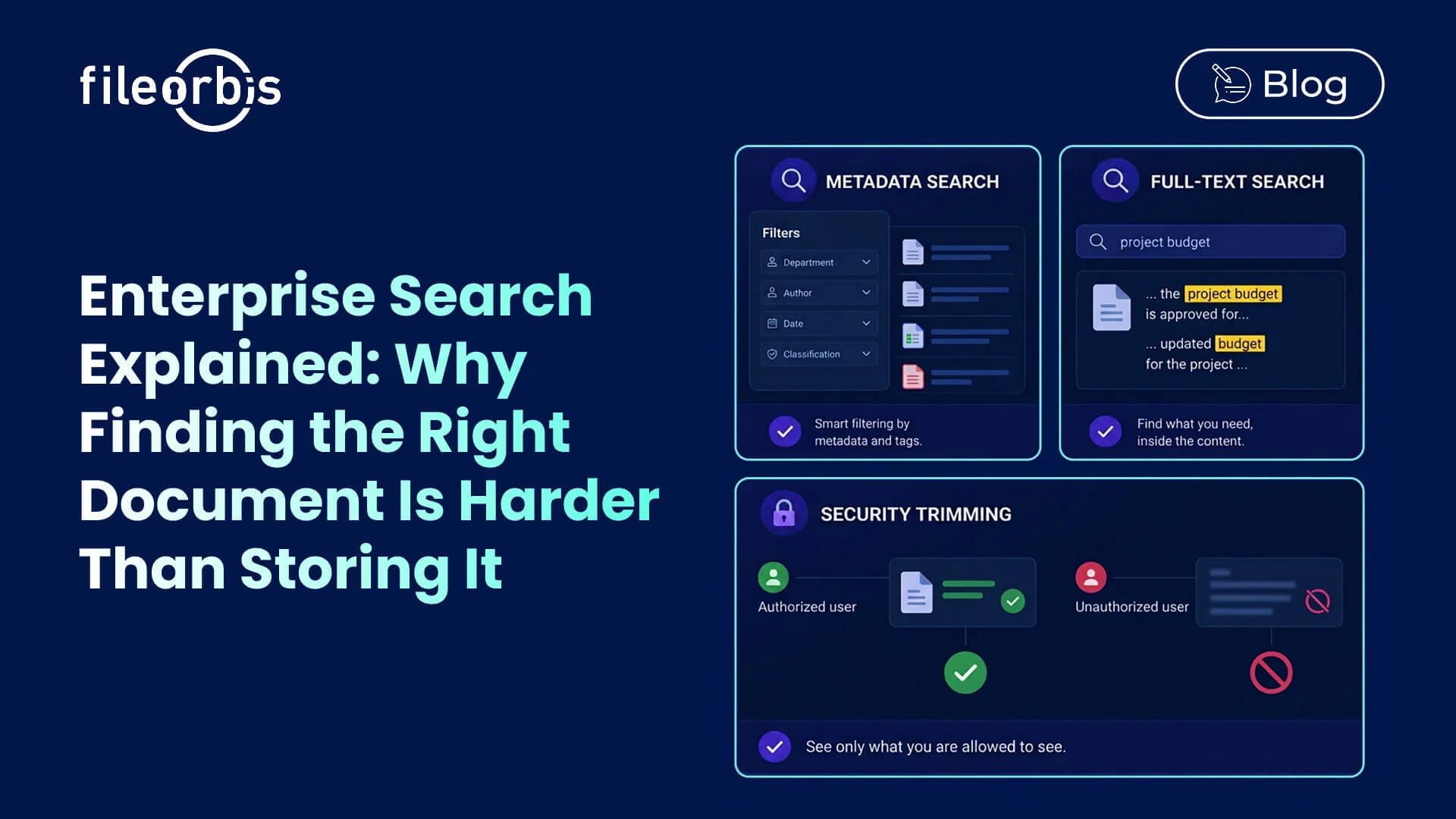
Security trimming ensures users only see search results they are authorized to access.
If a user does not have permission to open a document:
- The document does not appear in results
- Metadata remains hidden
- Snippets remain hidden
- Previews remain hidden
From the user’s perspective, the document does not exist.
Why Security Trimming Matters
Without security trimming, search engines can unintentionally reveal:
- Confidential projects
- Legal matters
- Executive communications
- HR investigations
- Customer information
Even displaying a file name may expose sensitive business information.
Security trimming prevents this risk.
Consistent Permissions Across Hybrid Environments
Modern organizations operate across hybrid environments.
Content may reside:
- On-premises
- In private clouds
- In public clouds
Enterprise search must respect permissions everywhere.
Security trimming should honor:
- Role-based access controls
- NTFS permissions
- ACLs
- Cloud permissions
- Repository-specific access models
This ensures consistent governance regardless of where content is stored.
Enterprise Search and AI: A Critical Connection
Search and AI are becoming increasingly interconnected.
Modern AI assistants rely on retrieval systems to locate relevant information before generating responses.
Poor search quality directly affects AI quality.
The Risk of Uncontrolled Search
Without governance:
- AI may surface outdated documents
- Sensitive information may appear unexpectedly
- Duplicate content may create confusion
Search as the Foundation of AI
Enterprise search provides the retrieval layer that powers:
- AI assistants
- Knowledge discovery
- Semantic search
- Retrieval-Augmented Generation (RAG)
Organizations that invest in strong search capabilities are simultaneously improving their AI readiness.
Business Benefits of Modern Enterprise Search
Organizations that implement advanced enterprise search gain measurable advantages.
Faster Information Discovery
Employees spend less time searching and more time working.
Better Decision-Making
Relevant information becomes accessible when needed.
Improved Security
Security trimming prevents accidental exposure of sensitive content.
Reduced Duplication
Users find existing content instead of recreating it.
Enhanced Compliance
Search respects the same governance and permission models that protect enterprise content.
The Future of Enterprise Search
Enterprise search is evolving beyond simple keyword matching.
Future-ready platforms increasingly combine:
- Metadata search
- Full-text search
- Security trimming
- Automated classification
- AI-powered discovery
- Federated search
The goal is not simply to search documents.
The goal is to connect people with trusted information as quickly and securely as possible.
Final Thoughts
The value of enterprise content depends on whether employees can find it.
Metadata search helps users locate documents through business context.
Full-text search helps users find content based on what documents actually contain.
Security trimming ensures users only see information they are authorized to access.
Together, these capabilities transform search from a simple convenience into a strategic business function.
Organizations that invest in modern enterprise search gain more than faster document discovery.
They improve productivity, strengthen security, enhance compliance, and create a stronger foundation for enterprise AI initiatives.
What is enterprise search?
Enterprise search is a technology that enables users to locate content across multiple repositories through a single search experience while respecting security permissions.
What is metadata search?
Metadata search allows users to find documents using attributes such as department, owner, classification, project, sensitivity level, and dates.
What is full-text search?
Full-text search analyzes the actual content of documents, allowing users to search for words, phrases, and text contained within files.
What is security trimming?
Security trimming filters search results based on user permissions, ensuring users only see content they are authorized to access.
Why is enterprise search important for AI?
Enterprise AI systems rely on search and retrieval capabilities to locate relevant content. Better search quality leads to more accurate, trustworthy AI outputs.

Gamze Karslı
Head of Marketing
Subscribe to our Newsletter
About FileOrbis
Aiming to manage the user and file relationship within an institutional framework, FileOrbis is constantly being developed in order to meet different industry and customer needs in terms of file management and sharing. Since 2018, FileOrbis continues to be developed with the excitement of the first day. FileOrbis focuses on high security, rich integration, ease of use and integrated management criteria.