
Controlling External Sharing and Guest Access in Microsoft 365: A Governance Guide
External sharing is one of the most operationally necessary — and compliance-sensitive — capabilities in any enterprise file platform. When a lawyer needs to share a contract draft with a client, when a finance team sends a report to an external auditor, or when an engineering team collaborates with a contractor, file sharing leaves the controlled perimeter of your organization. Managing this exposure without blocking legitimate business activity is the central challenge of external sharing governance.
The Spectrum of External Sharing Risk
Not all external sharing events carry equal risk. A helpful framework distin-guishes between three risk tiers:
Low Risk: Sharing non-sensitive, non-confidential documents with known, au-thenticated external parties for a defined duration and purpose.
Medium Risk: Sharing internal documents that contain business-sensitive information with partners or vendors, without formal approval or tracking.
High Risk: Sharing documents containing personally identifiable information, financial data, health records, or legally privileged content with any external party — whether intentionally or through misconfiguration.
The problem with most file platforms is that they apply the same sharing mech-anism to all three tiers. A user sharing a marketing brochure and a user sharing a customer database may follow an identical workflow. This absence of risk differentiation is where governance gaps emerge.
What Enterprise Governance Actually Requires
Organizations subject to regulatory oversight need external sharing controls that go beyond on/off toggles. The specific requirements that emerge repeatedly in compliance frameworks include:
Pre-Sharing Authorization Sensitive content must pass through a docu-mented approval process before external access is granted. The approver’s iden-tity, decision, and timestamp must be captured in a retrievable audit record.
Granular Link Controls Every external sharing link should carry configurable constraints: expiration date, password protection, download restriction (view-only mode), watermarking, and IP address allowlisting. These controls limit what a recipient can do with the content and reduce the blast radius if a link is forwarded.
Recipient Identity Verification Anonymous links — accessible to anyone who possesses the URL — are incompatible with regulated-industry compliance. External recipients should authenticate before accessing shared content, and their identity should be logged.
Revocation Capability When a project ends, an employee departs, or a com-pliance event occurs, all external access to relevant content should be revocable from a single interface, immediately.
Persistent Audit Record Every external access event — view, download, forward attempt, expiration trigger — should be recorded with user identity, timestamp, IP address, and device fingerprint. This record must be exportable for regulatory submissions.
How FileOrbis Manages External Sharing and Guest Access
FileOrbis was designed with regulated-industry external sharing as a primary use case. Rather than treating external sharing as a user-permission toggle,
FileOrbis treats it as a governed workflow with configurable controls at every step.
Approval-Gated Sharing Workflows
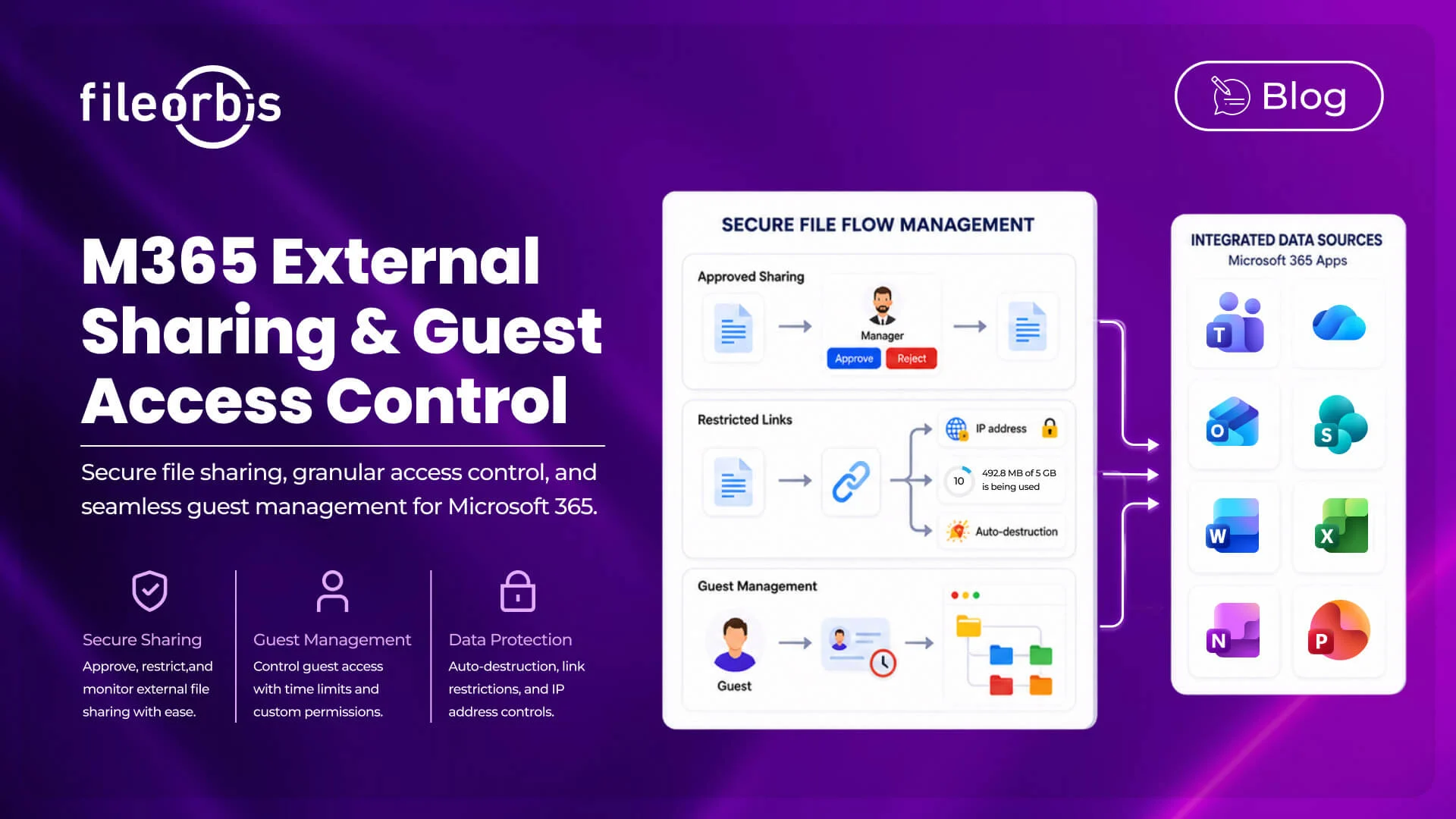
When a FileOrbis user initiates an external share, the system evaluates the content against active policies. If the document matches a policy requiring approval — based on content classification, folder location, or file type — the share request is automatically routed to a designated approver. The external link is not generated until the approval is recorded.
Approval chains can be as simple as a single-level manager review or as struc-tured as a sequential legal-compliance-IT sign-off process. All decisions are timestamped and attached to the audit record of the shared document.
Controlled External Link Generation
When an external link is created — with or without an approval workflow — FileOrbis enforces link-level controls that the initiating user can configure within permitted policy bounds:
- Expiration: Links expire automatically after a configurable number of days or upon a specific date. Expired links return a controlled error to the recipient.
- Password protection: A shared secret — distributed to the recipient via a separate channel — is required to access the link.
- View-only mode: Recipients can view document content within the FileOrbis secure viewer but cannot download, print, or copy the underlying
- Download limit: A maximum number of downloads per link can be set, after which the link deactivates.
- IP restriction: Access can be limited to specific IP ranges — useful for granting access only from a partner organization’s known network.
These controls apply uniformly regardless of the underlying storage location of the document — whether it resides in SharePoint, an on-premises file server, a NAS device, or a connected cloud storage repository.
Guest Access Management
For longer-term external collaboration — such as ongoing engagements with au-ditors, legal advisors, or technology partners — FileOrbis provides a structured guest access model:
Guests are provisioned as named users with defined access scopes. Their access does not extend beyond explicitly granted folders or documents. All guest ses-sions are logged with full activity detail. Access is governed by a defined start and end date, after which it expires automatically. Administrators can revoke guest access at any time from a centralized console.
This model gives external parties a consistent, professional collaboration experi-ence while maintaining complete organizational control over what they see and do.
Centralized External Sharing Dashboard
The FileOrbis administrator console provides a dedicated view of all active ex-ternal shares and guest access grants: who shared what, with whom, under what conditions, and what activity has occurred. This dashboard is the operational center for external sharing governance — enabling compliance teams to iden-tify exposures, revoke problematic shares, and produce audit evidence without accessing multiple subsystems.
Practical Implementation: Getting External Sharing Un-der Control
Organizations deploying FileOrbis to govern M365 external sharing typically follow a staged approach:
Phase 1 — Visibility: Connect FileOrbis to existing M365 and on-premises storage. Begin logging all sharing events without changing user behavior. Use the dashboard to understand the current external sharing footprint.
Phase 2 — Classification: Apply content classification policies. Identify which documents are currently shared externally that contain sensitive content. Define policy categories and associated controls.
Phase 3 — Enforcement: Enable approval workflows for high-risk content categories. Apply link controls to all new external shares. Notify users of the new requirements through in-platform messaging.
Phase 4 — Audit Readiness: Export historical and ongoing sharing logs in the format required by relevant compliance frameworks. Establish periodic reviews of active external access grants.
Subscribe to our Newsletter
About FileOrbis
Aiming to manage the user and file relationship within an institutional framework, FileOrbis is constantly being developed in order to meet different industry and customer needs in terms of file management and sharing. Since 2018, FileOrbis continues to be developed with the excitement of the first day. FileOrbis focuses on high security, rich integration, ease of use and integrated management criteria.