
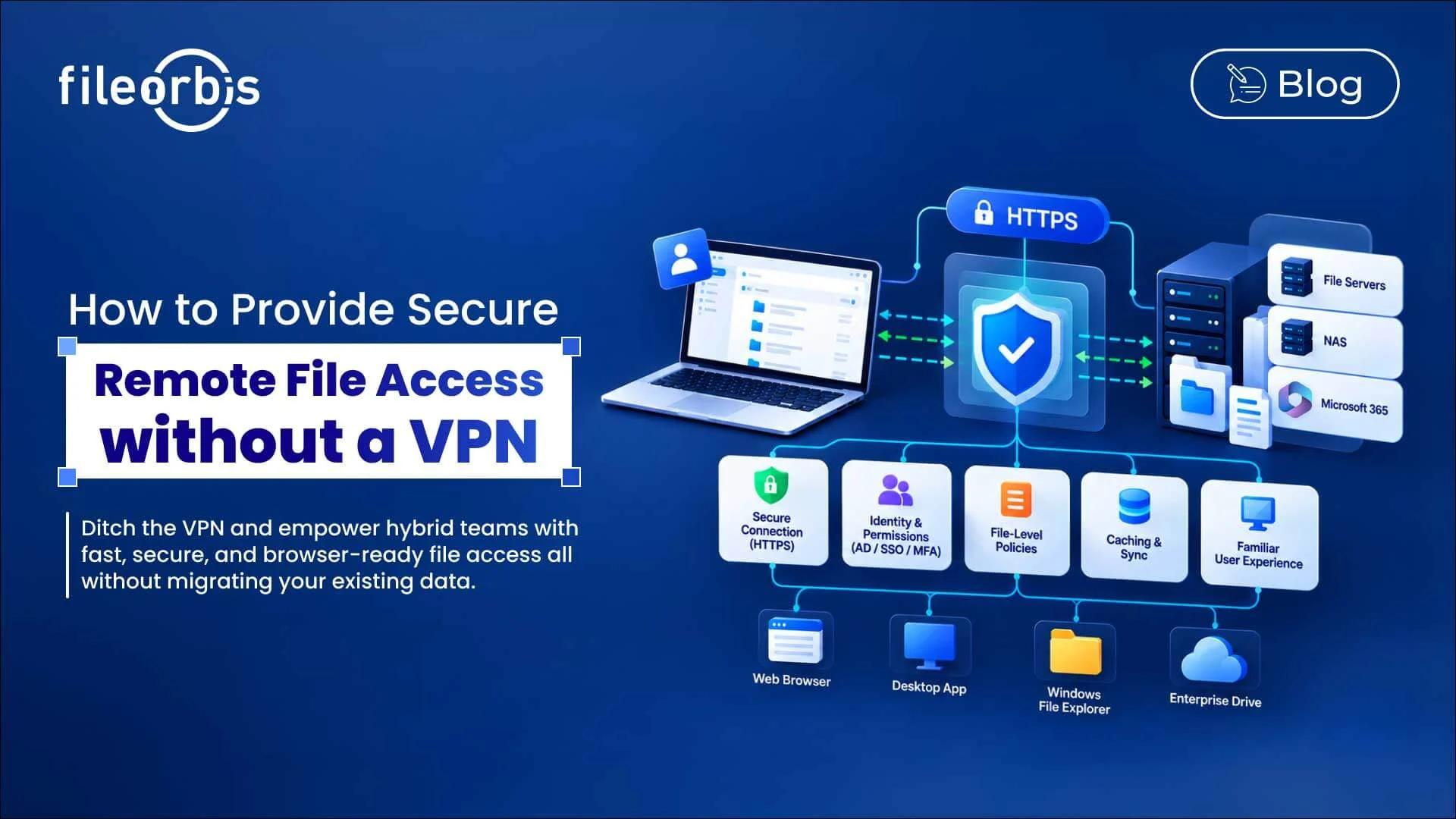
How to Provide Secure Remote File Access without a VPN
Hybrid and remote work have changed how employees access enterprise files. Traditional VPN-based access extends corporate network connectivity to remote users, but it can lead to latency, client management overhead, and requiring wider network access than users need to work with files.
Secure remote file access without a VPN offers another approach. Users can access authorized files over HTTPS, while organizations can centrally maintain identity, security policies, permissions, and audit controls.
Why is Traditional SMB Access Becoming Difficult for Remote Users?
SMB was primarily designed for file access over trusted networks. Extending traditional SMB access to remote networks can create challenges, especially when connections are slow, unstable, or geographically dispersed.
Common issues include:
- Latency: File operations can slow down on high-latency connections.
- Network exposure: Users may have a wider network connection than necessary for file access.
- Client management: IT teams need to deploy, update, and troubleshoot VPN software.
- VPN dependency: Users must establish a VPN connection before reaching file servers.
- User friction: Additional steps may encourage users to copy files to more easily accessible tools.
Organizations should avoid opening SMB directly to the internet. Secure alternatives can provide controlled remote access while protecting internal file infrastructure.
How Secure Remote File Access without VPN Works
A VPN-less architecture separates file access from network access.
Instead of connecting users to the corporate network, an encrypted HTTPS-based access layer authenticates users, controls permissions and policies, and provides controlled access to the existing file infrastructure.
A secure architecture should provide:
- HTTPS-based encrypted connection
- Authentication and multi-factor authentication (MFA)
- Integration of existing permissions
- Centralized policy enforcement
- File and folder-level authorization
- Activity logging and auditing
- Controlled downloading and sharing
- Secure caching when needed
This enables secure remote file access without exposing the SMB directly to the internet or migrating files to a new repository.
Using HTTPS for Remote File Access
Instead of extending traditional SMB connectivity over remote networks, organizations can provide browser-based or client-based file access over HTTPS.
This approach can:
- Operate through common firewalls and proxies
- Reduce direct exposure to internal file services
- Support browser and managed desktop access
- Keep existing storage space behind the access layer
The goal is to provide users with access to the files they need without requiring unnecessary network-level access.
Protect Identity and Existing File Permissions
Removing a VPN shouldn’t mean bypassing existing access controls.
Remote file access should be integrated with enterprise identity systems and existing permissions so that users can only see authorized content.
Key controls include:
- Active Directory integration
- Single sign-on
- Multi-factor authentication
- Existing NTFS permissions
- Least-privileged access
- Device and location-based policies
This allows organizations to extend existing authorization models to remote users instead of creating separate permission structures.
Enforcing Security Policies at the File Layer
Authentication identifies who the user is. Organizations also need to control what that user can do with files.
Centralized policies can govern actions such as:
- View
- Download
- Upload
- Delete
- Copy
- Edit
- Share
For sensitive information, organizations can apply content-aware controls such as DLP audits, approval workflows, sharing restrictions, and encryption.
Use Caching to Improve Remote Access Performance
Large files and unreliable connections can affect the remote user experience. Secure caching can reduce repeated transfers and provide faster access to frequently used files.
Organizations should consider:
- Client-side caching
- Controlled offline access
- Conflict management
- Automatic synchronization
- Centralized policy enforcement for cached files
Caching should improve performance without creating uncontrolled copies of enterprise data.
Make Remote File Access Familiar
Remote access should be compatible with how employees already work.
Here are some ways users might need access:
- Web browsers
- Desktop applications
- Windows File Explorer
- Managed enterprise drives
A familiar experience can reduce reliance on personal cloud storage, email attachments, and other unmanaged workarounds.
What to Look for in a VPN-Less Remote File Access Platform
When evaluating a platform, organizations should look for:
- HTTPS-based secure file access
- Enterprise identity and MFA integration
- Existing file and folder permission support
- Context-aware security policies
- Least-privilege access controls
- Download and sharing restrictions
- Secure caching and synchronization
- Browser and local desktop access
- Detailed audit logging
- Existing storage support without migration
The goal is to make remote access while keeping enterprise files under centralized control.
How FileOrbis Helps
FileOrbis enables organizations to modernize remote file access without moving data by providing a secure access layer on existing enterprise file environments.
FileOrbis supports:
- HTTPS-based access to enterprise files
- Identity and context-aware access controls
- Existing NTFS permissions and Active Directory
- Centralized file security and sharing policies
- Browser and desktop access
- Secure caching and synchronization via FileOrbis Drive
- Audit logging for file activity
While files remain in existing repositories, users gain controlled access to content they are authorized to access. This helps organizations reduce their reliance on network-level remote access while maintaining centralized governance.
In Summary
Secure remote file access without a VPN separates file access from broadband network access.
By combining HTTPS connectivity, enterprise identity, centralized policies, existing permissions, secure caching, and audit logging, organizations can provide remote users with controlled access to enterprise files while protecting their existing storage infrastructure.
Frequently asked Questions
Can users remotely access corporate file servers without using a VPN?
Yes. An HTTPS-based access layer provides controlled access to authorized files while the underlying file infrastructure remains protected.
Can existing NTFS permissions still be used?
Yes. A platform integrated with NFTS and Active Directory can preserve existing file and folder permissions for remote users.
Does VPN-less remote file access require moving files to the cloud?
No. FileOrbis can provide remote access while files remain on existing file servers, NAS, and other enterprise storage.

Gamze Mat
Product Manager
Subscribe to our Newsletter
About FileOrbis
Aiming to manage the user and file relationship within an institutional framework, FileOrbis is constantly being developed in order to meet different industry and customer needs in terms of file management and sharing. Since 2018, FileOrbis continues to be developed with the excitement of the first day. FileOrbis focuses on high security, rich integration, ease of use and integrated management criteria.