
Policy-Based File Sharing: From Static Rules to Context-Aware Decisions
Enterprise file sharing rarely adheres to simple rules like “The finance department can share this folder” or “External sharing is blocked.”
For example, the same file might be shareable with one recipient but restricted for another. A user might be allowed to view a document internally but not download it, send it externally, or transfer it across geographical boundaries.
Policy-based file sharing addresses this challenge by evaluating the context of the file operation before deciding what should be done.
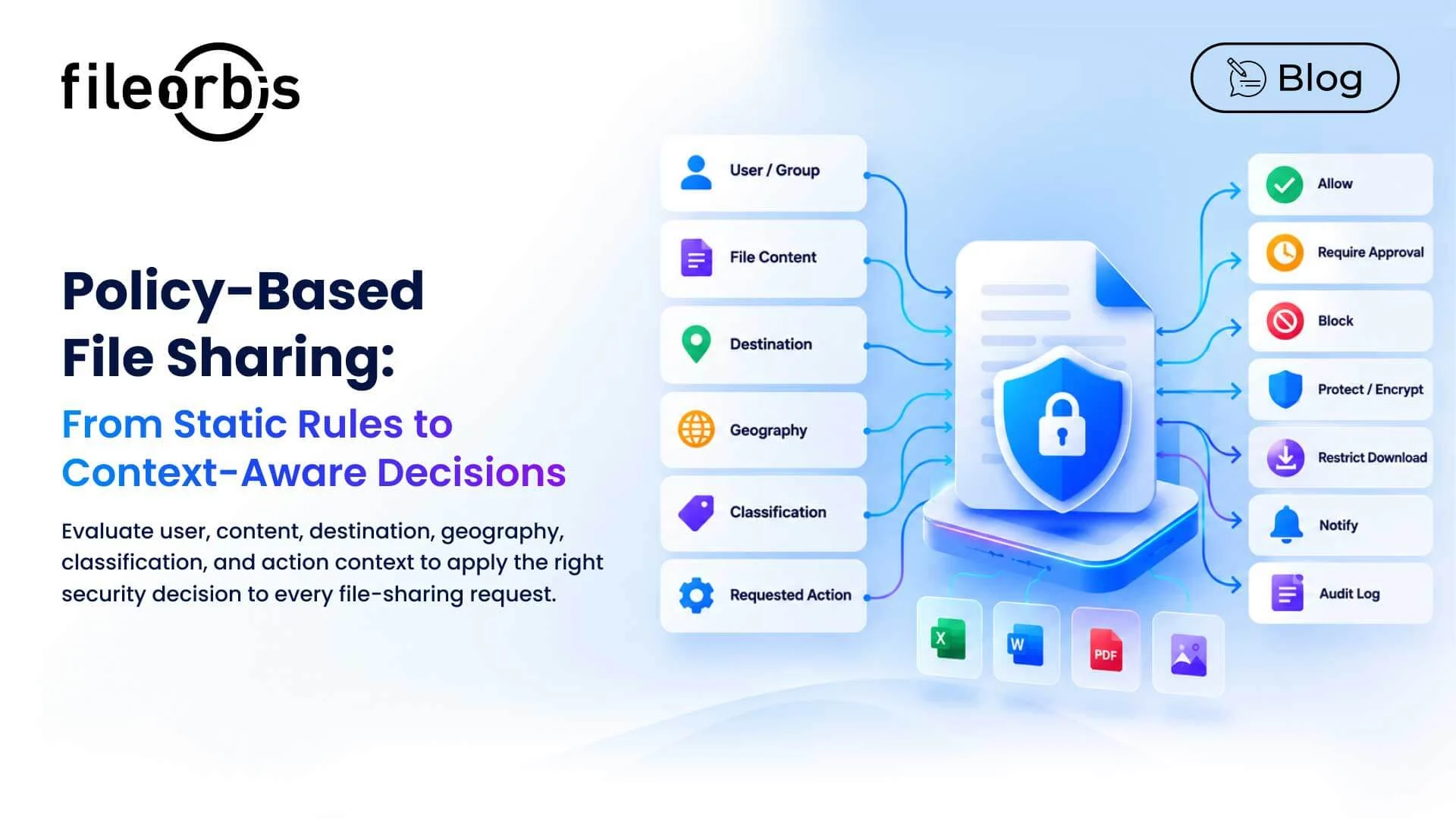
A policy can consider the following:
- User or group
- File content
- Destination
- Geography
- Classification
- Requested action
Based on these signals, the system can allow, restrict, block, require approval, protect, or register the action.
What is Policy-Based File Sharing?
Policy-based file sharing uses predefined security policies to determine how files can be accessed, shared, transferred, and downloaded.
Instead of relying only on static folder permissions, policies can combine multiple conditions.
For example, a policy might determine that a Finance user is attempting to share confidential financial data with an external recipient. In this case, the policy might require approval, apply appropriate protection, and log the activity.
This transforms file sharing from a static permission control to a context-aware policy decision.
What Context Can File Sharing Policies Evaluate?
1. User and Group
First, policies can consider who performed the action; these include:
- User Identity
- Group membership
- Department
- Existing permissions
- Business role
This helps to ensure file sharing is compliant with least-privileged access.
2. File Content
In addition the user context, the content itself can influence the decision.
Policies may specify:
- Personal information
- Contracts
- Employee records
- Financial data
- Sensitive technical information
- Intellectual property
As a result, controls are based not only on the file location but also on the sensitivity of the information.
3. Destination and Geography
However, where a file goes can be as important as its content.
Policies may distinguish between:
- Internal users
- Approved partners
- Guest users
- External recipients
- Geographic or jurisdictional boundaries
- Approved and restricted destinations
While sharing a confidential file internally might be permitted, sending the same file outside an approved geography may require additional controls.
4. Classification
Classification labels can become active policy triggers.
For example:
- Public: Sharing is allowed
- Private: Approval is required
- Restricted: External sharing is blocked
- Internal: External sharing is restricted
Therefore, classification becomes part of policy enforcement rather than just a descriptive label.
5. Requested Action
Policies may respond differently depending on what the user wants to do:
- View
- Download
- Edit
- Upload
- Copy
- Delete
- Share
- Transfer
For instance, a user may have the authority to view a file without having the authority to download or share it externally.
From Context to Policy Decision
A context-aware policy engine can consider the user, file content, destination, classification, geography, and requested action together before making a decision.
Depending on this context, the policy can:
- Allow action
- Require approval
- Block action
- Apply watermark or encryption
- Restrict downloads
- Inform security teams
- Create audit log
Therefore, the goal is not simply to block file sharing, but to apply appropriate control to each situation.
Policy-Based File Sharing Examples
- Finance
A financial analyst wants to send a spreadsheet containing client financial information to an external auditor.
The policy could identify sensitive content, recipient, classification, and the requested sharing action.
Decision: Require approval, apply appropriate protection, and log the activity.
- Engineering
Likewise, an engineering team needs to share technical design files with an approved supplier.
Decision: Allow controlled sharing, documenting the activity, provided the supplier and geographic destination meet policy requirements.
- HR
An employee is attempting to send a file containing sensitive employee information to an external recipient.
Decision: Block external sharing or direct an authorized exception through an approval process.
- Legal
Similarly, a legal team needs to share a confidential agreement with approved external attorneys.
Decision: Allow controlled external sharing while maintaining access restrictions and audit logs.
Test Policies Before Implementation
However, a policy that is too broad can disrupt legitimate business processes. A policy that is too narrow can lead to the exposure of sensitive information.
Before full implementation, organizations should consider:
- Which files and users will be affected?
- How many approval requests will be generated?
- Which operations will be blocked?
- Do policies overlap or conflict?
- Are legitimate workflows being disrupted?
Organizations can test policies, improve the rules, review the results, and then implement them.
This helps security teams strengthen controls without creating unnecessary friction.
Managing Policy Exceptions without Creating Permanent Exceptions
Some business processes require exceptions. Therefore, the important thing is that these are controlled and traceable.
An exception process should define:
- Business justification
- Limited scope
- Required approver
- Audit record
- Expiration date
Temporary exceptions should not develop into permanent policy gaps.
Measuring and Reporting Policy Decisions
Reporting helps security and compliance teams understand how policies work in practice.
Useful records include:
- Relevant user and file
- Policy triggered
- Decision taken
- Requested action
- Timestamp
- Approval or exception
This provides evidence for policy reviews, investigations, and audits, helping teams identify policies that may need improvement.
How FileOrbis Helps
FileOrbis integrates content awareness, permissions, classification, approval workflows, sharing controls, and audit logs into a unified governance layer.
Organizations can apply policies based on the following factors:
- File content and sensitive data
- Users, departments, and roles
- File location and destination
- Classification labels
- Internal or external sharing context
- Requested file operations
Policies can then trigger controls such as protecting, approving, blocking, notifying, or audit logging.
Because FileOrbis works with existing enterprise file environments, organizations can empower file sharing governance without requiring repository migration.
In Summary
Policy-based file sharing takes file security beyond static permissions by combining identity, content, destination, geography, classification, and user actions.
With context-aware policies, organizations can make more informed sharing decisions while supporting legitimate collaboration and maintaining auditability.
FileOrbis helps apply these controls across existing enterprise file environments without requiring data migration.

Gamze Karslı
Head of Marketing
Subscribe to our Newsletter
About FileOrbis
Aiming to manage the user and file relationship within an institutional framework, FileOrbis is constantly being developed in order to meet different industry and customer needs in terms of file management and sharing. Since 2018, FileOrbis continues to be developed with the excitement of the first day. FileOrbis focuses on high security, rich integration, ease of use and integrated management criteria.