
AI Residency: Where Do Your Prompts, Embeddings and Enterprise Files Go?
Enterprise AI causes more data movement than many organizations realize. While the source document may reside on a file server, NAS, SharePoint, or cloud storage, the information derived from it moves between extraction services, vector databases, AI models, command prompts, logs, and generated outputs.
This makes determining where AI processes are executed, processed, and maintained a broader question than simply identifying where the original file is stored. Organizations need visibility into where each component of the AI workflow esides, how long systems retain it, and where processing occurs.
What Is AI Residency?
AI residency is the ability to understand and control where enterprise information resides and where AI systems process it throughout an AI workflow.
This includes:
- Source files
- Extracted text and document fragments
- Embedded data and vector indexes
- AI model processing
- Prompts and retrieved content
- AI-generated outputs
- Logs and conversation history
For enterprises with data sovereignty or regulatory requirements, each tier can bring a different physical or legal position.
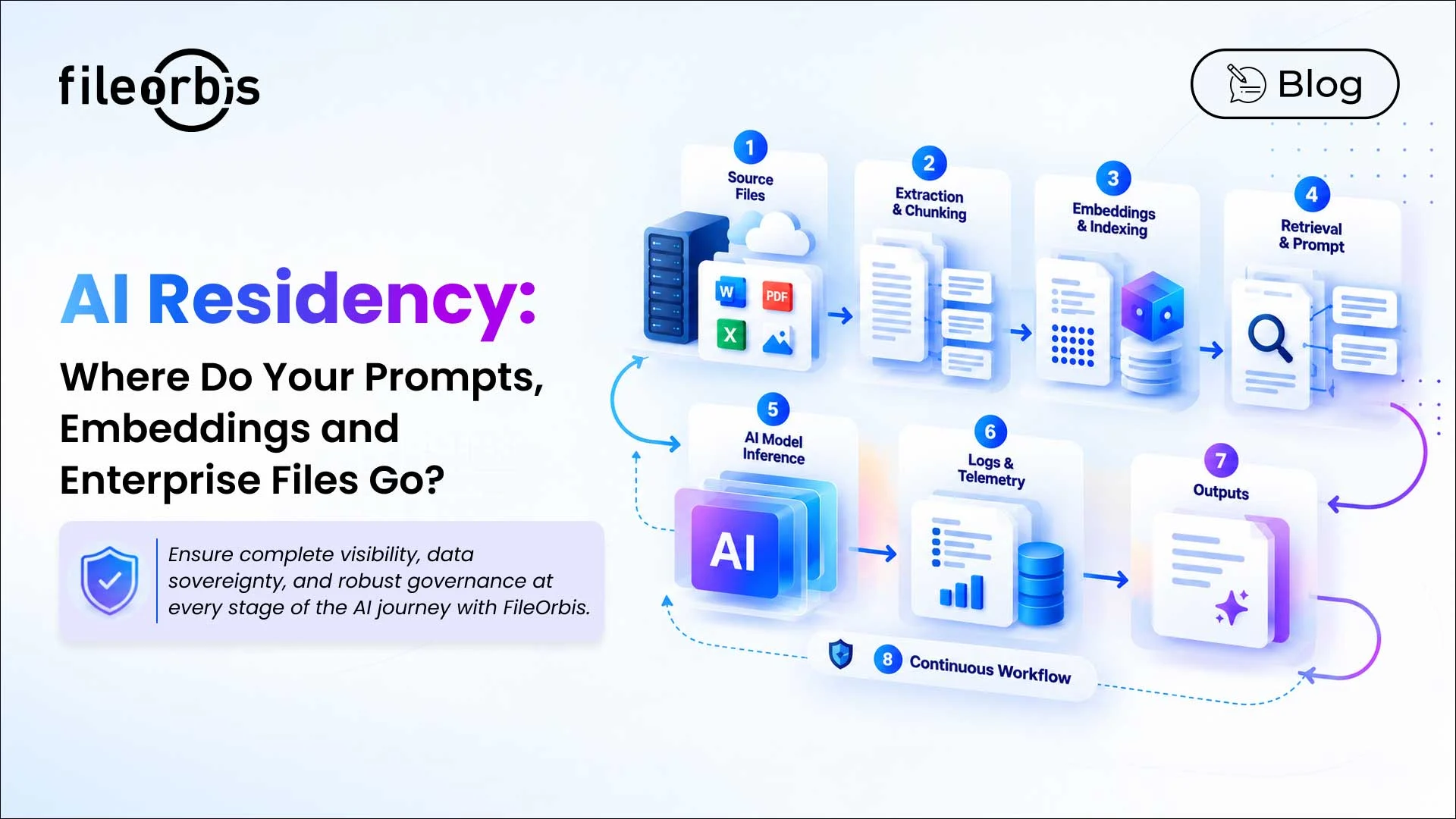
The Enterprise AI Data Journey
Understanding AI residency begins with tracing data from the original data repository to the final AI response.
Source Files
Enterprise AI can retrieve information from file servers, NAS, M365, SharePoint, cloud storage, and other repositories.
Before connecting repositories to AI services, organizations should determine the physical location of the original files and under which jurisdiction they are located.
Extracted Text and Document Fragments
RAG and enterprise AI systems typically break down and partition document content into smaller chunks before indexing it.
Organizations should understand:
- Where content extraction occurs
- How long systems retain extracted content
- Whether the process creates temporary copies
- Whether the processing exceeds jurisdictional boundaries
Embedded Vectors and Vector Indexes
The extracted content can be converted into embedded vectors and stored in a vector database for retrieval.
Key considerations include:
- Where systems create embeddings
- Where the vector database is hosted
- Which service performs the vectorization
- Whether the indexes remain locally or in a required region
- How the indexes are updated when files or permissions change
The original file can remain in the correct jurisdiction while the AI service processes data derived from it elsewhere.
Prompts and Retrieved Content
In the RAG workflow, the user prompt can be combined with retrieved document fragments, user identity, system instructions, and conversation context.
This means that residency controls should cover not only the prompt itself but also the organizational information associated with it before model processing.
AI Model Processing
AI inference can occur in the following ways:
- On-premises models
- Models hosted in selected cloud regions
- Private cloud environments
- External AI providers
- Multiple model architectures
Organizations need to know which model processes each workload and where that processing occurs.
Policy-based model guidance can also help ensure that sensitive workloads remain in validated AI environments. FileOrbis supports on-premises and cloud models, policy guidance, and controlled AI processing architectures.
Logs, Conversation History, and Telemetry
AI platforms can generate additional information beyond prompts and responses, including:
- Document references
- User identities
- Conversation history
- Audit events
- Application logs
- Operational telemetry
These records may contain sensitive business context and should therefore be included in AI residency assessments.
Outputs Generated by AI
AI responses and generated files also become enterprise knowledge.
Organizations should determine:
- Where the outputs reside
- Whether the generated files are entered into governed repositories
- How long systems retain outputs
- Which permissions apply
- Whether classification and security policies continue to be implemented
Questions Enterprises Should Ask About AI Residency
A practical AI residency assessment should track the entire workflow:
- Where are the source files stored?
- Where is extraction and splitting taking place?
- Where are embedded vectors generated and where are vector indexes stored?
- Which AI models are retrieving enterprise information?
- Where is the prompt and retrieved content processed?
- Where is model inference taking place?
- Is any provider or sub-processor moving data to another jurisdiction?
- Where are logs, outputs, and conversation history retained?
- Can the processing and storage locations be shown to auditors?
This creates a more complete residency map than simply checking the location of source repositories.
Why AI Residency Requires Data Governance
Knowing where AI data is located is only part of the problem. Organizations also need to control what information AI can access and who can retrieve that information. Therefore, AI expertise should be part of broader AI risk management and data governance practices.
- Sensitive data discovery and classification
- Least privileged access
- Policy-based model routing
- Content-aware policies
- Permission-aware data retrieval
- Retention controls
- Monitoring and audit logs
Permission-aware RAG is particularly important because existing repository permissions need to remain valid when enterprise content is integrated into AI retrieval workflows.
How FileOrbis Helps
FileOrbis helps organizations govern enterprise information in existing repositories and extend those controls to AI workflows.
Capabilities include:
- Governance of data where it already lives
- Local AI processing options
- Custom vector database locations
- Content-aware and permission-aware RAG
- Policy-based AI model routing
- AI activity monitoring and audit logging
This approach helps organizations control both the enterprise data that AI can utilize and the environments in which that data is processed.
In Summary
The process goes beyond simply having AI residency in enterprise files. Organizations need to understand the entire journey of the data:
- Source File
- Extraction,
- Embedding
- Vector Index
- Retrieval
- Prompt
- Model
- Output
- Logs
Mapping each stage helps compliance, security, and AI teams determine where corporate information is processed, stored, and retained as it moves through AI systems.
The real question is no longer just “Where is our data stored?”
It’s also becoming increasingly important to ask, “When artificial intelligence uses our data, where does our data go?”

Gamze Karslı
Head of Marketing
Subscribe to our Newsletter
About FileOrbis
Aiming to manage the user and file relationship within an institutional framework, FileOrbis is constantly being developed in order to meet different industry and customer needs in terms of file management and sharing. Since 2018, FileOrbis continues to be developed with the excitement of the first day. FileOrbis focuses on high security, rich integration, ease of use and integrated management criteria.