
M365 Copilot Oversharing: Fix Your Permissions Before You Roll Out
There’s a comforting myth about M365 Copilot security: that the risks are exotic, such as prompt injection, model training on your data, or hallucinated answers. Those are real topics, but they aren’t the one that shows up in production.
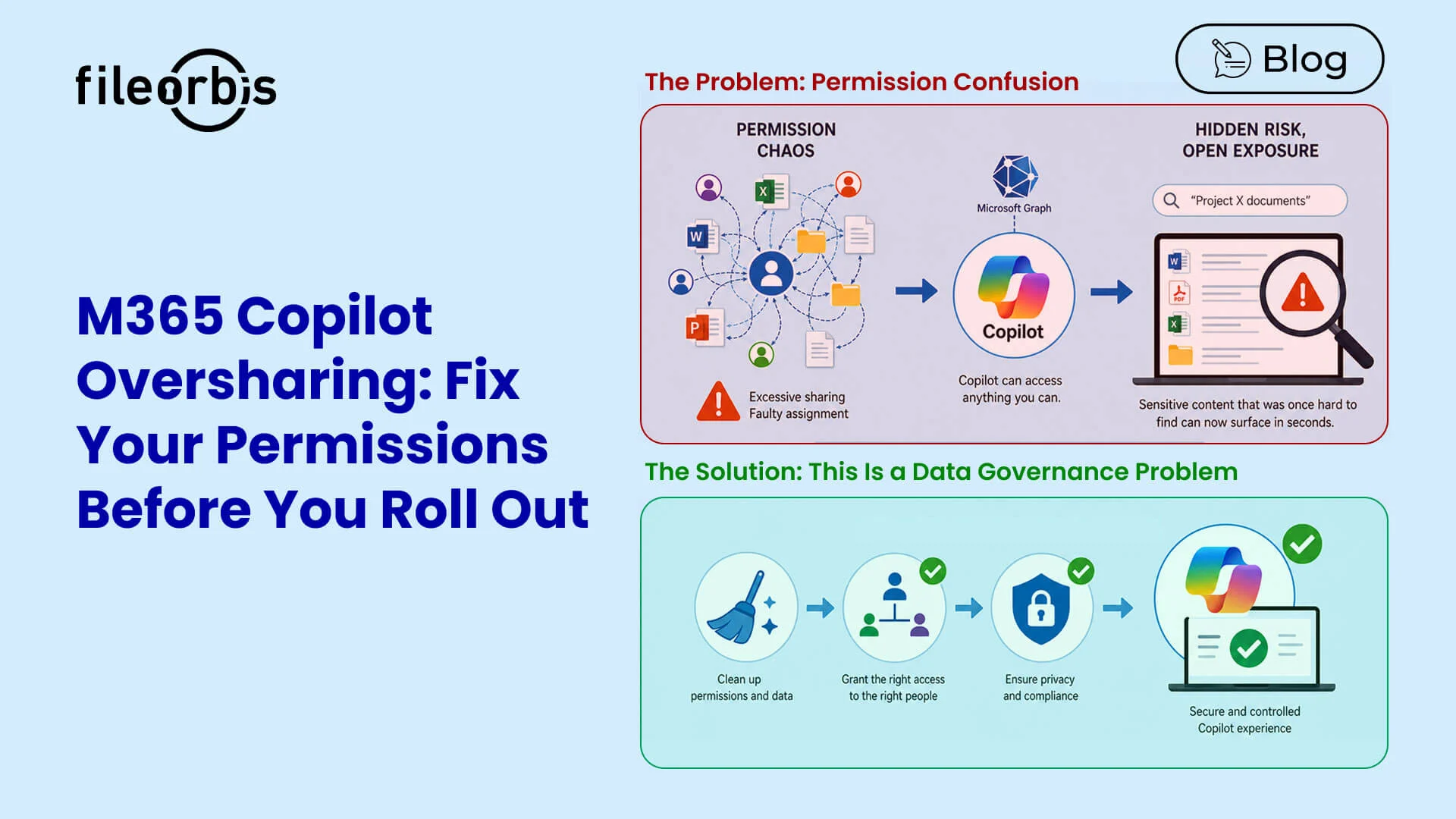
The risk that shows up in production is much more boring, and much more dangerous: Copilot can read everything the person prompting it can already read. And in most tenants, people can read far more than anyone realizes.
Why Copilot Turns Quiet Exposure into Loud Exposure
Copilot retrieves content through Microsoft Graph using the requesting user’s own identity. There is no separate permission layer between the user and the data. Copilot honors exactly the access that user already has. Microsoft is explicit about this: SharePoint and OneDrive access controls shape what Copilot can surface, but Copilot does not change anyone’s permissions.
That design is correct from a security standpoint, and it’s also exactly why oversharing becomes a problem. Every “Everyone except external users” link, every team site that was opened up “just for this project” two years ago, every OneDrive folder shared a little too broadly, Copilot inherits all of it, verbatim.
The difference is discoverability:
- Before Copilot: Finding the salary spreadsheet in an overshared site required knowing it existed and where to look.
- After Copilot: An employee simply asks, “What does the leadership team earn?” and a well-meaning AI assembles the answer from content it was technically allowed to read.
Copilot didn’t create the exposure. It removed the friction that kept the exposure invisible.
This Is a Permission Problem, Not an AI Problem
The implication is liberating, once you accept it: Copilot readiness is a data-governance project, not an AI safety project. Get the permission graph right and Copilot becomes safe to deploy. Leave it wrong and no amount of model tuning will save you.
Industry data backs this up:
- Gartner has projected that by 2027 a majority of organizations will fail to realize the value they expect from AI because of incohesive data foundations rather than model limitations.
- The work that determines Copilot’s success happens before Copilot is ever switched on.
Microsoft provides genuinely useful tooling here. SharePoint Advanced Management’s data access governance reports, Restricted Access Control, sensitivity labels, and Purview DLP for Copilot all help you find and contain exposure. But reports identify risk; they don’t remediate it at scale, and they live inside the M365 boundary while much of an enterprise’s sensitive content does not.
Where FileOrbis Fits
FileOrbis Governance for M365 embeds directly into SharePoint Online and OneDrive and adds a content-aware enforcement layer on top of the native experience. It turns “we can see the risk” into “the risk is gone.”
- Content-aware policy before sharing and before grounding: FileOrbis analyzes file content in real time and can trigger approvals, block sharing, or restrict access automatically when sensitive data is detected. This prevents files containing regulated content from quietly becoming broadly readable, whether the consumer is a person or Copilot.
- Remediation at scale across the whole estate: Because the same platform governs your file servers, NAS, and other repositories alongside M365, oversharing clean-up isn’t limited to one cloud. Content-based batch operations can re-scope, isolate, watermark, or restrict thousands of files on policy, with an audit trail to prove it.
- Enforcement that survives, plus advanced controls: Beyond cleanup, FileOrbis adds geo-fencing, IP restrictions, PGP encryption, and malware sanitization to M365 sharing. It extends Zero Trust controls into the daily right-click workflow without forcing users out of their familiar tools.
A Practical Sequence
The pattern that works is simple and repeatable: audit, remediate, enforce.
- Audit: Find where sensitive content overlaps with broad or stale access.
- Remediate: Fix the high-risk overlaps automatically rather than ticket by ticket.
- Enforce: Keep them fixed with content-aware policies that prevent the next round of drift, so your tenant stays Copilot-ready instead of sliding back within a quarter.
The Takeaway
M365 Copilot is only as safe as your permission graph. The organizations that deploy it confidently aren’t the ones with the best prompts. They’re the ones who treated rollout as a permission-layer cleanup and put governance in place to keep it clean.
Do that work first, and Copilot becomes what it’s supposed to be: a productivity multiplier that never says something it shouldn’t.
Preparing for Copilot? Talk to FileOrbis about a content-aware governance and oversharing assessment.

Emre Demiray
Founder – FileOrbis
Subscribe to our Newsletter
About FileOrbis
Aiming to manage the user and file relationship within an institutional framework, FileOrbis is constantly being developed in order to meet different industry and customer needs in terms of file management and sharing. Since 2018, FileOrbis continues to be developed with the excitement of the first day. FileOrbis focuses on high security, rich integration, ease of use and integrated management criteria.