Zero Trust File Access: Securing Enterprise Files Beyond Network Perimeter
Enterprise files are distributed across file servers, NAS devices, and hybrid storage environments. Employees, business partners, and contractors need secure access to these resources from different locations and devices.
Traditional network-based security models can create risks when authenticated users are given broader access than their responsibilities require.
Zero trust file access addresses this challenge by shifting security decisions from network location to authenticated identity, controlled operations, and file permissions. This approach helps enterprises protect sensitive content without restricting legitimate collaboration.
What is Zero Trust File Access?
Zero Trust File Access applies Zero Trust principles directly to enterprise files and documents.
Instead of trusting users based on their network location, organizations verify identities and enforce permissions for individual files and resources.
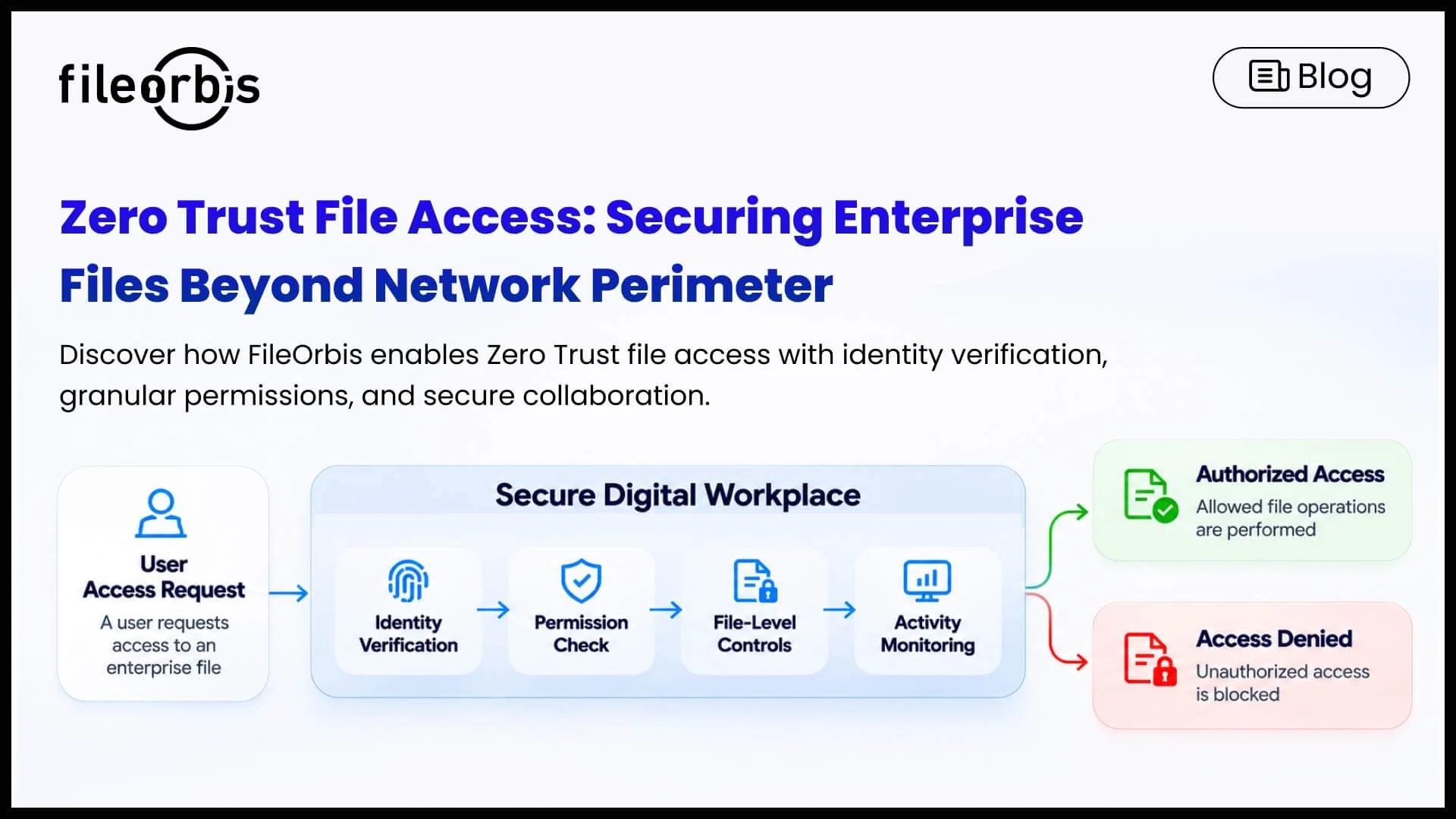
This approach focuses on four core requirements:
- Identity verification: Authenticate users through corporate identity systems.
- Granular file controls: Manage authorized viewing, sharing, downloading, and editing.
- Least privileged access: Restrict file access based on defined permissions
- Activity visibility: Monitor file operations to support security and compliance.
Together, these controls help organizations manage who can access enterprise content and what they can do with it.
Why Traditional File Access Models Create Security Risks
Enterprise file environments often combine legacy infrastructure with modern collaboration tools. Without consistent file-level security, several risks can arise:
- Broad network access: Traditional VPN connections can provide access to more internal resources than users need.
- Fragmented policies: Different repositories and access methods make consistent security enforcement difficult.
- Excessive permissions: Legacy group memberships and inherited access rights can expose sensitive files.
- Limited visibility: Network-level monitoring may not capture detailed file downloads, sharing activities, or modifications.
Addressing these risks requires security controls that operate at the file layer, rather than relying solely on network connectivity.
Essential Security Controls for Zero Trust File Access
Identity-Based Authentication and Authorization
Organizations should verify user identities before granting access to enterprise files.
Capabilities include:
- Active Directory, LDAP, and enterprise SSO integration.
- Role-based authorization.
- Multi-factor authentication.
- Consistent authentication across supported access methods.
These measures help ensure that file access decisions reflect verified identities and corporate responsibilities.
Secure Remote Access without Broad Network Exposure
Remote file access should not require users to connect to the entire corporate network.
A file-focused access architecture can protect internal file servers from direct external exposure while providing secure HTTPS connections to authorized repositories.
However, a connection without a VPN alone does not provide Zero Trust. Identity verification and resource-level authorization remain essential.
Least Privilege and Permission-Aware File Access
Users should only be able to access files and folders that are necessary for their responsibilities.
Organizations can enforce this principle by respecting existing directory groups and file system permissions, removing unnecessary privileges, and reviewing inherited access rights.
This reduces the likelihood of sensitive documents becoming accessible through outdated or excessive permissions.
Granular File Sharing and Download Controls
Access security should also govern how users interact with files after authentication.
Organizations should consider controls such as:
- View-only access and download restrictions.
- Approval workflows for external sharing.
- Expired or revocable sharing links.
- Watermarking for confidential documents.
These capabilities help protect sensitive content during internal and external collaboration.
File Activity Monitoring and Auditability
Security teams need visibility into file access, downloads, modifications, and sharing activities.
Detailed audit logs and SIEM integration can help organizations investigate suspicious behavior, support compliance assessments, and identify policy violations.
How FileOrbis Helps
FileOrbis extends zero-trust principles to enterprise file environments with its Secure Digital Workspace solution.
The platform provides a centrally governed access and collaboration layer across existing file servers, NAS devices, and supported cloud storage without requiring data migration.
Key capabilities include:
- Permission-aware access: Integrates with enterprise identity systems and respects existing file permissions.
- File system federation: Connects distributed repositories through a unified access environment.
- VPN-less remote access: Provides secure access to enterprise files without directly exposing internal file servers.
- Content security: Supports malware scanning, sandboxing, CDR, and DLP integration.
- Policy-based collaboration: Enforces file operation controls, secure sharing restrictions, and approval workflows.
- Auditing and SIEM integration: Provides file activity logs for security monitoring and compliance.
With flexible on-premises, private cloud, and hybrid deployment options, FileOrbis helps organizations strengthen file access security while protecting their existing infrastructure.
In Summary
Zero-trust file access helps organizations protect their enterprise files by enforcing identity-based access, granular security controls, and the least privilege permissions. This approach strengthens file protection while supporting secure collaboration, rather than relying solely on network security.
FileOrbis Secure Digital Workplace helps enterprises implement these principles by providing secure, centrally governed access to existing file infrastructure without requiring data migration.

Mert Topaloğlu
Senior Presales Consultant
Subscribe to our Newsletter
About FileOrbis
Aiming to manage the user and file relationship within an institutional framework, FileOrbis is constantly being developed in order to meet different industry and customer needs in terms of file management and sharing. Since 2018, FileOrbis continues to be developed with the excitement of the first day. FileOrbis focuses on high security, rich integration, ease of use and integrated management criteria.