AI File Access Permissions: Why Existing Access Rights Matter
Enterprise AI systems increasingly rely on internal documents to summarize information, answer questions, and support business decisions. However, connecting AI to corporate file repositories introduces a critical security issue: ensuring users can only access information they are authorized to access.
Traditional file systems enforce permissions through user identities, access control lists (ACLs), and security groups. These restrictions should remain in place when AI systems retrieve and process corporate content.
Without properly governed AI file access permissions, organizations risk disclosing confidential documents and sensitive business information through AI-generated responses.
What are AI File Access Permissions?
AI file access permissions determine which corporate files an AI system can access and use when responding to a specific user.
Unlike traditional file access where employees open documents directly, AI systems retrieve information on their behalf. Therefore, AI access should reflect:
- User Identity: Who is requesting the information?
- Content sensitivity: Does the information require additional protection?
- Existing permissions: Which files does the user have access to?
For example, an HR employee can access payroll records, while a sales employee cannot. A corporate AI assistant connected to the same repository should maintain this distinction.
Why AI File Access Create Security Challenges
Enterprise files are typically distributed across file servers, NAS, SharePoint, and cloud storage. Each environment may use different permission structures, making consistent AI access control difficult.
Organizations should address challenges:
- Outdated authorization data: AI indexes or cached permission information may not reflect recent access changes.
- Excessive permissions: Inherited access rights and outdated group memberships can expose more information than employees need.
- Inconsistent repository controls: Different access models across enterprise storage environments can create gaps in AI access.
These issues become particularly significant when AI can search and summarize information from multiple repositories through a single interface.
Key Security Risks of Uncontrolled AI File Access
Without appropriate controls, enterprise AI can create a variety of security risks:
- Unauthorized access: AI accesses documents outside the authorized scope of the requesting user.
- Cross-user leakage: Incorrect scoped access leads to information leakage between users or departments.
- Sensitive data exposure: Confidential information appears in responses generated without appropriate restrictions.
- Limited auditability: Security teams cannot determine which documents were accessed during AI interactions.
These risks demonstrate that AI security should extend beyond model-level controls and include enterprise file access governance.
How to Enforce AI File Access Permissions
Preserve Existing File Permissions
Enterprise AI should respect existing NTFS permissions, Active Directory groups, ACLs, and repository-specific access controls.
This approach helps maintain consistent authorization without requiring administrators to recreate permission structures for AI applications.
Maintain Current Authorization Information
Employee roles and file permissions change over time. AI systems should take these updates into account to prevent revoked access rights from remaining effective through cached results or outdated indexes.
Apply Permission-Aware Retrieval
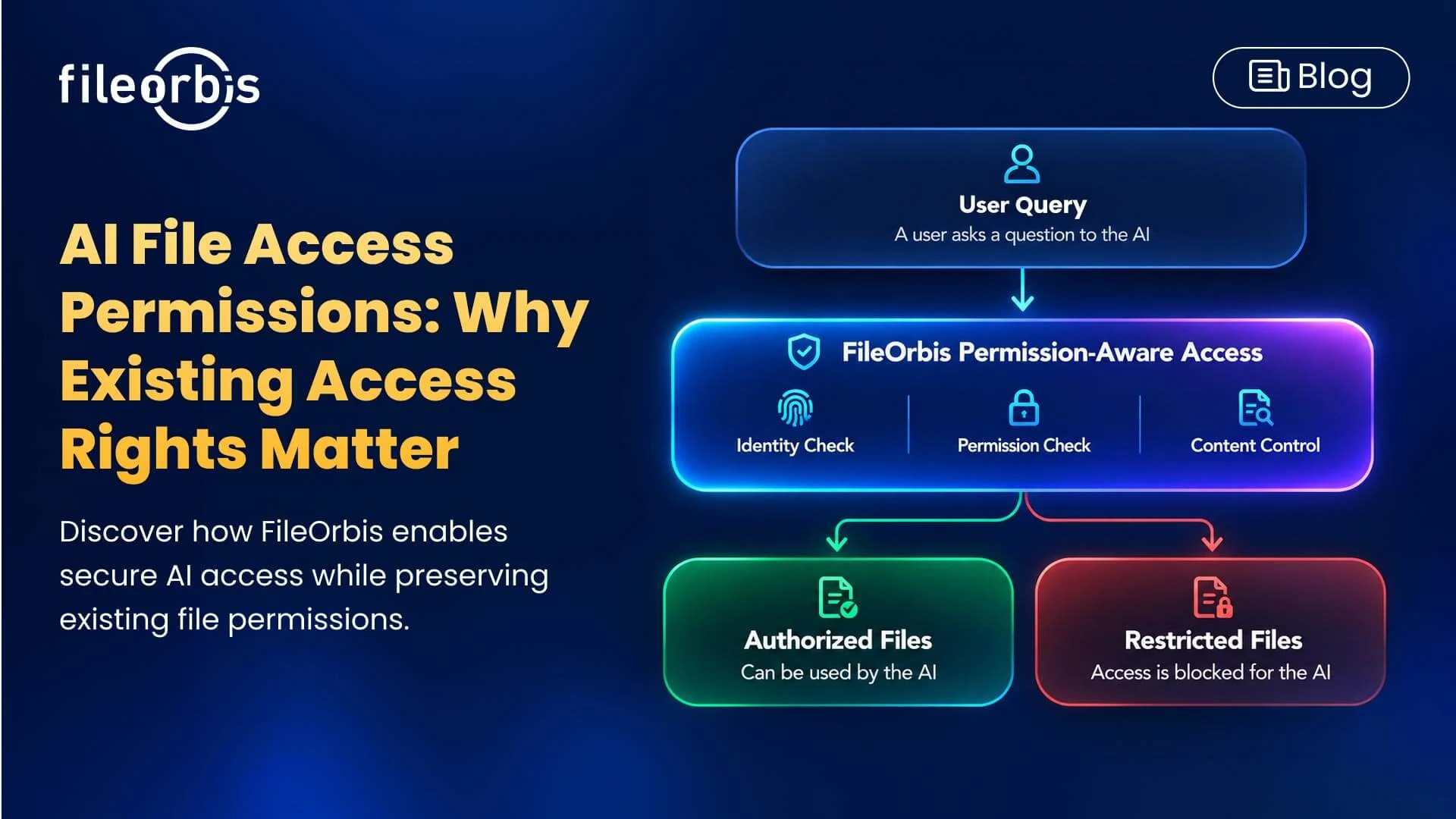
AI systems should evaluate the access rights of the requesting user before retrieving documents.
Permission-aware retrieval prevents unauthorized content from reaching the language model. These restrictions should also include document metadata, source references, and previews.
Apply Least Privilege and Content-Aware Policies
AI systems should only retrieve the information necessary for an authorized request.
Additionally, organizations should classify sensitive files and apply appropriate restrictions, including filtering, anonymizing, or masking.
Permission-aware AI does not automatically resolve excessive permissions at the source. Therefore, organizations should also identify and remediate unnecessary access rights in existing repositories.
Monitoring and Auditing AI Access
Security teams need visibility into how AI interacts with enterprise content.
Audit logs should help track user identities, permission decisions, received documents, and restricted access attempts to support investigations and compliance requirements.
How FileOrbis Helps
FileOrbis extends enterprise file security controls into AI-powered workflows, enabling organizations to connect their existing repositories to AI while maintaining defined access boundaries.
Instead of migrating data or recreating permission structures, FileOrbis integrates with existing file environments and applies permission-aware and content-aware controls during AI interactions.
Key capabilities include:
- Real-Time Permission Controls: Evaluates user authorization during AI queries to reduce unauthorized access.
- Permission-Aware AI Access: Enforces existing NTFS, ACL, and repository permissions during AI retrieval.
- Sensitive Data Protection: Supports filtering, anonymization, and masking according to enterprise policies.
- Content-Aware Classification: Identifies sensitive information and applies classification- based restrictions.
- Existing Repository Integration: Connects AI to file servers, NAS, SharePoint, and cloud storage without requiring source file migration.
- Flexible AI Deployment: Supports local and cloud-based language models depending on infrastructure and data protection requirements.
- Auditing and Monitoring: Provides visibility into AI queries, document retrieval, and policy enforcement activities.
FileOrbis helps organizations adopt AI without unnecessarily expanding access privileges by governing AI access directly against existing enterprise files.
In Summary
Enterprise AI should respect existing file access rights to prevent unauthorized data exposure. By combining permission-based access, content-aware security controls, and least-privileged access, organizations can ensure secure AI access to enterprise files while protecting sensitive information.

Emre Demiray
Founder – FileOrbis
Subscribe to our Newsletter
About FileOrbis
Aiming to manage the user and file relationship within an institutional framework, FileOrbis is constantly being developed in order to meet different industry and customer needs in terms of file management and sharing. Since 2018, FileOrbis continues to be developed with the excitement of the first day. FileOrbis focuses on high security, rich integration, ease of use and integrated management criteria.