
SFTP Automation: How to Secure and Simplify Enterprise File Transfers
Enterprise file transfers are essential to daily business operations. Organizations regularly exchange financial reports, operational data, customer records, and business-critical documents between internal systems, external partners, and cloud environments.
However, many enterprises still rely on manually configured SFTP connections, custom scripts, and disconnected file transfer tools. As transfer volumes increase, maintaining and securing these approaches becomes more challenging.
SFTP automation helps organizations streamline recurring file exchanges, reduce manual intervention, and improve operational efficiency. For enterprises handling sensitive information, automation should also support content inspection, security policies, and auditability.
What is SFTP Automation?
SFTP automation enables secure file transfers between systems without requiring manual intervention for each transfer.
Organizations can configure scheduled, event-driven, or application-triggered workflows to perform the following operations:
- Connecting enterprise systems: Moving data between applications and storage environments.
- Scheduling recurring transfers: Exchanging files at predefined intervals.
- Triggering workflows: Initiating actions based on transfer events.
- Automating collaborative exchanges: Delivering files to suppliers, business partners, and customers.
- Tracking operations: Identifying failed or incomplete transfers.
By eliminating repetitive manual tasks, SFTP automation helps IT teams manage file exchanges more efficiently.
Why Traditional SFTP Automation Is No Longer Enough
Traditional SFTP provides encrypted file transfer, but enterprise requirements often extend beyond basic connectivity.
Many organizations rely on scheduled scripts or separate SFTP servers, creating several challenges:
- Maintenance complexity: Custom scripts require updates when infrastructure, credentials, or business processes change.
- Fragmented governance: Separate servers and workflows make consistent security implementation difficult.
- Limited content visibility: Encrypted transfer doesn’t identify sensitive information or malicious files.
- Insufficient audit information: Basic transfer logs may fail to capture security decisions or approval activities.
Overcoming these limitations requires automation tools that integrate file transfer execution with enterprise security and governance capabilities.
Key Capabilities of Secure SFTP Automation
Automated Scheduling and Workflow Execution
Modern SFTP automation should support repetitive and event-driven transfers without relying entirely on custom scripts.
Key capabilities include:
- Automatic file routing.
- Scheduled and application-triggered transfers.
- Retry mechanisms and exception handling.
- Integration with existing workflows.
These capabilities help organizations maintain reliable file exchange between connected systems.
Malware Inspection and Threat Prevention
Automatic data exchange with external systems can introduce enterprise environments with malicious content.
Security inspection capabilities may include:
- Antivirus scanning.
- Content Disarm and Reconstruction (CDR).
- Sandboxing.
- Data Loss Prevention (DLP) inspection.
Integrating these controls into transfer workflows helps identify threats before files reach their destinations.
Content-Aware Security and Policy Enforcement
Encryption protects files during transmission but does not determine whether their content is appropriate for destination.
Content-aware controls allow organizations to:
- Identify and restrict sensitive file transfers.
- Apply encryption or additional protection.
- Require approval for specific exchanges.
- Quarantine or block files that violate policies.
This adds a layer of security beyond a traditional SFTP connection.
Centralized Monitoring and Audit Logging
Enterprises need visibility into transfer activities across systems and departments.
Central monitoring should include:
- Source and destination information.
- Initiators and recipients of the transfer.
- Transfer status and timestamps.
- Security inspection results and policy decisions.
These logs support incident investigations, troubleshooting, and compliance assessments.
Integration with Existing Enterprise Infrastructure
Enterprise file transfers typically involve legacy applications, file servers, NAS environments, cloud storage, and collaboration platforms.
SFTP automation solutions should connect these environments without requiring organizations to change their existing applications or storage systems.
Common Use Cases of Enterprise SFTP Automation
SFTP automation supports business processes across many industries.
- Manufacturing and logistics: Transfer purchase orders, inventory records, and shipping documents between business partners.
- Financial services: Automate the exchange of transaction files, payment reports, and regulatory documents.
- Enterprise application integration: Connect legacy systems with modern applications and cloud storage through automated file exchange.
These scenarios demonstrate how automation can reduce manual processing in complex enterprise environments.
How FileOrbis Helps
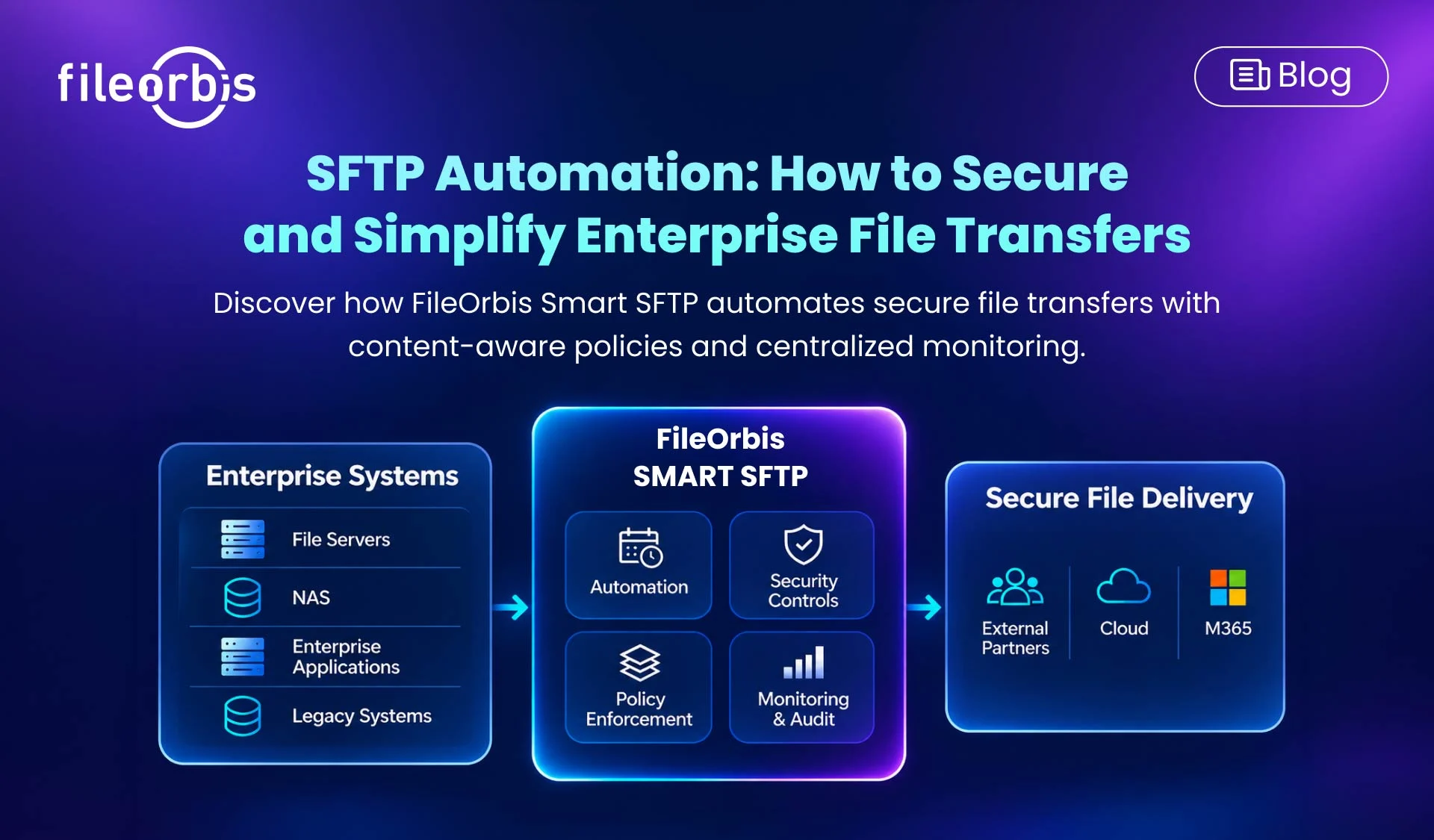
FileOrbis Smart SFTP combines automated file exchange with content-aware security and centralized management.
It extends traditional SFTP functionality by:
- Automated workflows: Supports scheduled, repetitive, and event-driven transfers with API and webhook integration.
- Policy-based transfers: Enforces content-aware security rules, approval requirements, and transfer restrictions.
- Centralized auditability: Maintains transfer logs and integrates security events with SIEM systems.
- Integrated security auditing: Utilizes antivirus scanning, CDR, sandboxing, and DLP controls.
- Flexible deployment: Supports on-premises, private cloud, and hybrid environments without requiring data migration.
- Multiple protocol connectivity: Supports SFTP, HTTPS, FTPS, and WebDAV on existing storage environments.
For example, an organization could enable the automated delivery of financial reports from a legacy application to M365 while applying security audits and transfer policies.
With FileOrbis Smart SFTP, businesses can modernize their file exchange workflows while maintaining control over sensitive information.
In Summary
SFTP automation simplifies enterprise file exchange by reducing manual processes and improving operational efficiency. However, organizations that handle sensitive information also need content-aware security, policy enforcement, and auditability.
FileOrbis Smart SFTP brings these capabilities together, enabling automated and secure file transfers across your existing enterprise infrastructure.

Gamze Karslı
Head of Marketing
Subscribe to our Newsletter
About FileOrbis
Aiming to manage the user and file relationship within an institutional framework, FileOrbis is constantly being developed in order to meet different industry and customer needs in terms of file management and sharing. Since 2018, FileOrbis continues to be developed with the excitement of the first day. FileOrbis focuses on high security, rich integration, ease of use and integrated management criteria.