
DSPM Remediate: How to Detect and Fix Enterprise Data Security Risks
Enterprise files are distributed across file servers, NAS devices, OneDrive, SharePoint, and cloud storage. As these environments grow, sensitive data can become overexposed through outdated access rights, excessive permissions, and inappropriate storage locations.
Data Security Posture Management (DSPM) helps organizations identify these risks. However, visibility alone does not reduce exposure.
DSPM Remediate extends data security posture management from risk detection to controlled remediation, helping enterprises address security gaps across existing file environments.
What is DSPM Remediate?
DSPM Remediate is an approach to data security that combines sensitive data discovery, corrective action, and risk assessment.
It enables organizations to:
- Discover sensitive data: Identify personal, confidential, and business-critical information.
- Prioritize risks: Focus remediation efforts on high-risk files and access conditions.
- Assess exposure: Analyze file locations, permissions, and sharing activity.
- Apply corrective actions: Enforce policies through controlled remediation workflows.
- Monitor changes: Identify new risks as permissions, files, and user access evolve.
The goal is to turn security findings into measurable improvements in data protection.
Common Data Security Risks That Require Remediation
Sensitive Data in Inappropriate Locations
Confidential information may be stored in shared folders, locations with insufficient protection or cloud repositories.
Organizations need to identify these files and apply appropriate controls, including encryption, relocation, or restricted access.
Excessive File Permissions
Employees and external users may retain access to files they no longer need. Broad group permissions and inherited access rights can increase the risk of unauthorized exposure.
Remediation focuses on reviewing excessive access and applying least-privilege permissions.
Obsolete, Redundant, and Dark Data
Unnecessary files increase the amount of information organizations must secure and manage.
Policy-based archiving, deletion and retention can reduce this exposure while preserving information subject to legal or business requirements.
Orphaned Files and Stale Access
Files without clear ownership and permissions associated with inactive users can create unmanaged security risks.
Assigning ownership, applying retention policies, and reviewing outdated access help restore accountability.
How DSPM Remediate Works
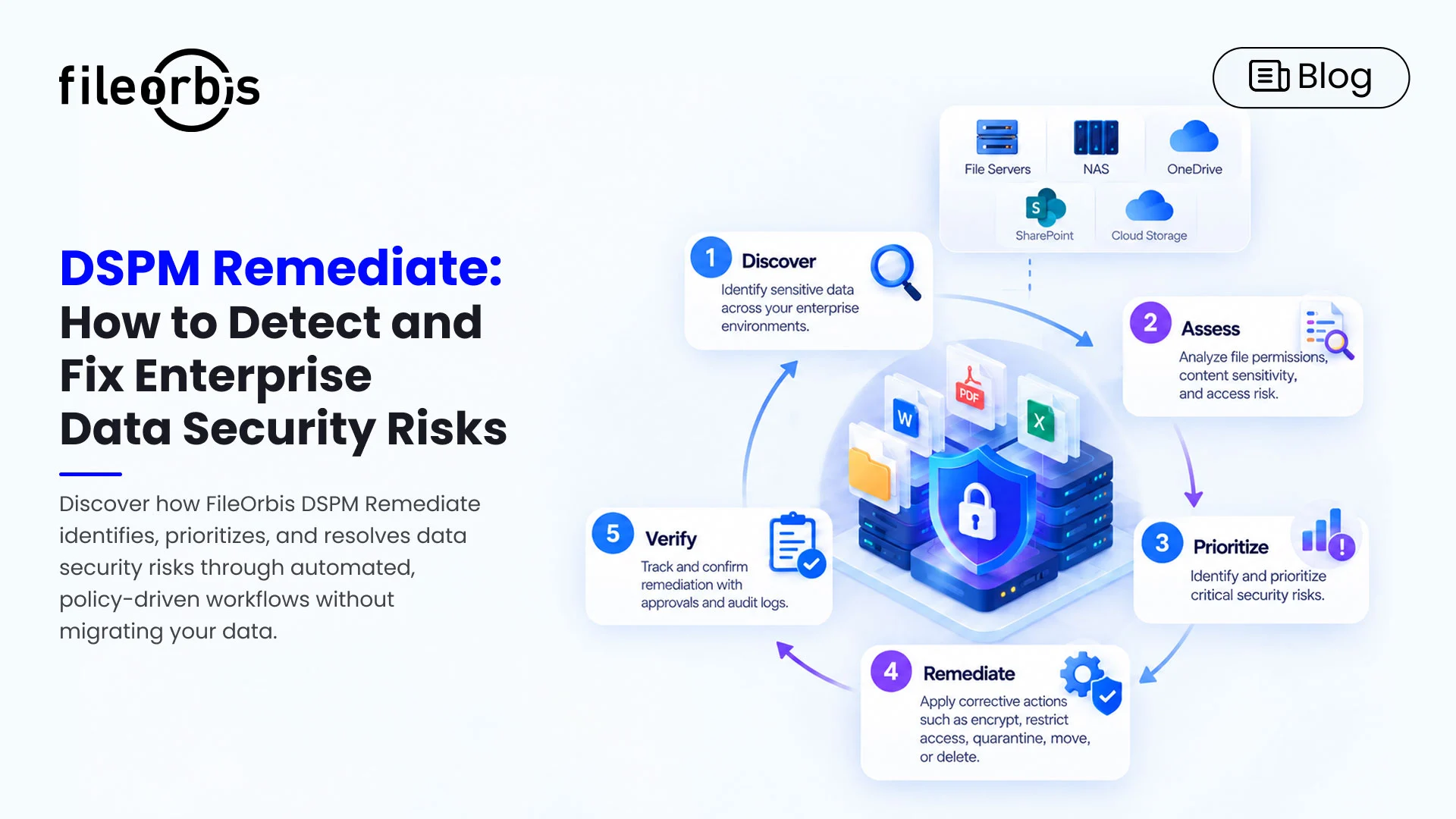
An effective DSPM remediate process follows five steps:
- Discover: Locate sensitive files in enterprise repositories.
- Assess: Evaluate exposure based on permissions, content sensitivity, and storage context.
- Prioritize: Identify risks requiring immediate attention.
- Remediate: Apply approved actions such as permission changes, quarantine, encryption, or file relocation.
- Verify: Approve corrective actions and maintain audit logs for accountability.
This process helps security teams move from isolated findings to consistent, policy-driven risk reduction.
The Importance of Automated DSPM Remediate
Manually resolving data security findings in large file environments is a time-consuming and difficult to scale.
- Improve consistency: Apply standardized controls across repositories.
- Reduce remediation time: Address recurring risks without relying entirely on manual intervention.
- Maintain oversight: Route sensitive actions through approval workflows.
- Support audit readiness: Record remediation activities and policy decisions.
Automation should operate within defined security policies and require human approval when business impact or data sensitivity necessitates it.
How FileOrbis Helps
FileOrbis DSPM Remediate helps enterprises identify and address risks directly within their existing storage environments, without requiring repository migration.
Its capabilities include:
- Permission Risk Analysis: Identify excessive access and potentially exposed files using existing permission structures.
- Deep Content Inspection: Detect sensitive information, including personal, financial, and confidential business data.
- Policy-Driven Remediate: Apply corrective actions such as encryption, relocation, quarantine, deletion or archiving.
- Approval-Based Workflows: Maintain control over remediation decisions that require authorization.
- ROT and Dark Data Management: Address obsolete, redundant, and unmanaged information.
- Continuous Risk Monitoring: Monitor changes in data exposure and security posture.
FileOrbis also integrates with existing enterprise infrastructure, including Active Directory and SIEM solutions, to support identity-based governance and security monitoring.
By addressing risks where the data already resides, FileOrbis helps organizations strengthen protection without altering their existing file infrastructure.
In Summary
DSPM Remediate helps enterprises move beyond identifying data security risks and instead address them with controlled and policy-driven actions.
FileOrbis combines permission analysis, content inspection, and remediation capabilities to reduce sensitive data exposure across existing repositories.
Ready to strengthen your enterprise data security posture? Request a demo to see FileOrbis DSPM Remediate in action.
Frequently Asked Questions
How does DSPM Remediate help reduce enterprise data security risks?
FileOrbis DSPM Remediate identifies sensitive data risks and provides policy-driven remediation on existing repositories without the need for data migration.
Does DSPM Remediate require data migration?
Not necessarily. FileOrbis DSPM Remediate works with existing repositories without requiring a platform-wide migration. Individual files can be relocated when remediation policies require it.
Can DSPM remediation reduce excessive file permissions?
Yes. DSPM remediation can identify unnecessary access rights and support permission adjustments based on least-privilege policies.

Mert Topaloğlu
Senior Presales Consultant
Subscribe to our Newsletter
About FileOrbis
Aiming to manage the user and file relationship within an institutional framework, FileOrbis is constantly being developed in order to meet different industry and customer needs in terms of file management and sharing. Since 2018, FileOrbis continues to be developed with the excitement of the first day. FileOrbis focuses on high security, rich integration, ease of use and integrated management criteria.