
File System Federation: How to Unify Distributed Enterprise File Systems
File System Federation: How to Unify Distributed Enterprise File Systems
File system federation is becoming increasingly important as enterprise file infrastructure grows more fragmented. Organizations store business-critical information across on-premises file servers, network-attached storage (NAS), cloud storage, and collaboration platforms.
As these environments expand, employees must navigate multiple repositories, while IT teams face increasing management and security challenges.
By connecting distributed file systems through a common logical layer, organizations can simplify file access and management without requiring physical storage consolidation.
What is File System Federation?
File system federation is an architectural approach that connects independent file systems and storage repositories through a common access and management layer.
Rather than physically consolidating data, federation creates a unified namespace that allows users to access files across different storage environments through a consistent interface.
A federated file system can connect various enterprise storage sources, including:
- Network-attached storage (NAS)
- Windows file servers
- SMB file shares
- SharePoint
- OneDrive
- Network File System (NFS) repositories
- SFTP repositories
- S3-compatible object storage
Each connected repository can continue operating independently while participating in a centrally managed file environment.
Why Enterprises Need File System Federation
As organizations expand across offices, departments, and geographic regions, their file infrastructure becomes increasingly difficult to manage.
Common challenges include:
- Complex Permission Management: Distributed file systems make access rights difficult to review and manage.
- Fragmented File Access: Employees navigate multiple repositories, access interfaces, and network drives.
- Limited Visibility: IT teams lack a consolidated view of enterprise file environments.
How Does File System Federation Work?
A federated architecture introduces a logical layer between users and underlying storage systems.
Instead of connecting to each repository independently, users access enterprise files through a common interface.
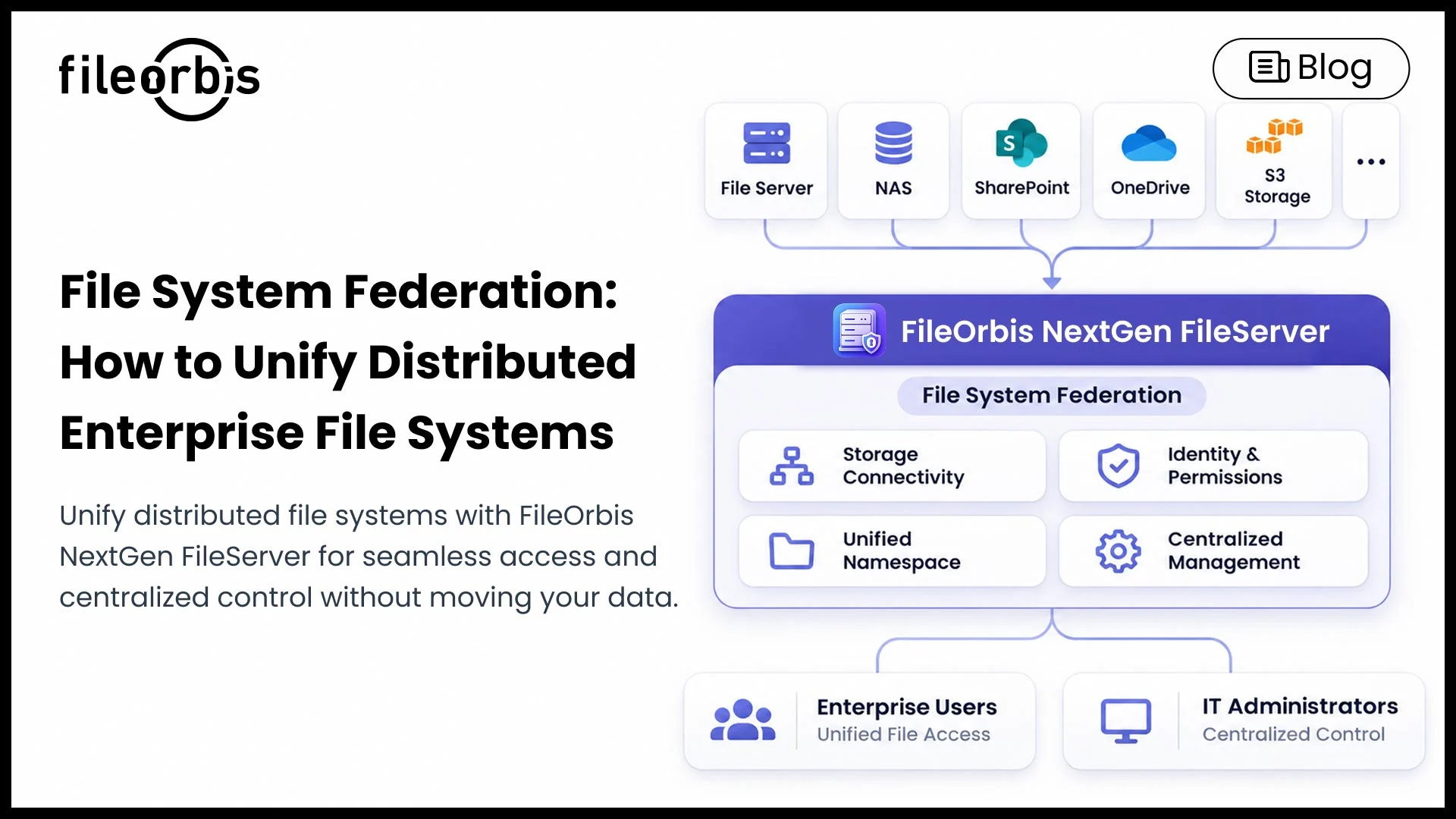
An effective federated file system architecture combines four essential components:
- Storage Connectivity: Integrates heterogeneous file systems and storage protocols.
- Identity and Permission Integration: Determines accessible files based on established user identities and access rights.
- Unified Namespace: Presents distributed repositories through a common logical file structure.
- Centralized Management: Provides administrative visibility across connected repositories.
This architecture separates the user access experience from the underlying storage infrastructure, allowing organizations to deploy new storage technologies without unnecessarily disrupting existing workflows.
Key Benefits
Beyond simplifying file access, federation supports long-term infrastructure and security objectives.
- Improved Employee Productivity: Reduce the time employees spend navigating separate file environments.
- Preserved Storage Investments: Extend the operational value of existing file servers and storage systems.
- Simplified IT Operations: Reduce administrative complexity through centralized management.
- Data Sovereignty: Maintain control over where enterprise files physically reside.
- Infrastructure Scalability: Incorporate additional repositories as business requirements evolve.
- Consistent File Governance: Implement coordinated access and security controls across connected environments.
File System Federation vs. Storage Consolidation
Although both approaches address fragmented file environments, they operate differently.
Storage consolidation physically moves files into fewer repositories or a centralized storage environment. As a result, organizations may need to redesign permissions, modify existing workflows, and transfer large volumes of data.
File system federation, on the other hand, connects existing repositories logically while preserving their underlying storage structures.
For enterprises with established infrastructure, hybrid storage environments, or strict data residency requirements, federation offers a less disruptive approach to unifying file access.
How FileOrbis Helps
FileOrbis NextGen FileServer enables organizations to connect, manage, and modernize distributed file infrastructure without requiring large-scale data migration.
Its file system federation and complementary capabilities include:
- Unified File Access: Provide employees with a consistent interface for accessing enterprise files.
- Multi-Protocol File Federation: Connect heterogeneous on-premises and cloud repositories within a common logical file environment.
- Centralized Permission Management: Manage access rights while respecting existing Active Directory and NTFS permissions.
- Metadata Management: Organize enterprise files through metadata and improve content accessibility.
- Edge Caching: Improve file access performance for distributed offices and remote locations.
- Virtual Drive Access: Enable on-demand file access through FileOrbis Drive without full synchronization.
- File Activity Monitoring: Maintain visibility into file operations through centralized audit logging.
By combining file system federation with access management and governance capabilities, FileOrbis helps organizations transform fragmented storage environments into a centrally managed enterprise file infrastructure.
In Summary
Modernizing enterprise file infrastructure does not necessarily require replacing existing storage systems.
File system federation allows organizations to separate file access and management from physical storage, reducing infrastructure complexity while maintaining control over enterprise data.
The goal is not to store every file in a one place, but to enable distributed file environments to work together securely and efficiently.
Learn more about FileOrbis NextGen FileServer for centralized management, unified file access, and secure file system federation without data migration.
Frequently Asked Questions
What is file system federation?
File system federation connects independent file systems and storage repositories through a unified logical access and management layer while allowing files to remain in their existing locations.
Does file system federation require data migration?
No. Federation logically connects existing repositories rather than physically consolidating them, allowing organizations to unify file access without mandatory data migration.
How does FileOrbis help file system federation?
FileOrbis NextGen FileServer connects existing file servers, NAS, and cloud repositories through a common access and management layer while supporting centralized file governance and preserving established permissions.

Faris Suleiman
Presales Manager, KSA & Egypt
Subscribe to our Newsletter
About FileOrbis
Aiming to manage the user and file relationship within an institutional framework, FileOrbis is constantly being developed in order to meet different industry and customer needs in terms of file management and sharing. Since 2018, FileOrbis continues to be developed with the excitement of the first day. FileOrbis focuses on high security, rich integration, ease of use and integrated management criteria.