
SFTP File Scanning: Detect Threats Before Files Reach Enterprise Storage
SFTP file scanning helps organizations secure file transfers between enterprise systems, business partners, and external users. While SFTP encrypts data during transmission, encryption alone doesn’t prevent malicious files or sensitive information from moving between trusted environments.
By adding content inspection to secure file transfer workflows, SFTP file scanning enables organizations to identify sensitive data, detect malware, and enforce security policies before files reach their destinations.
What is SFTP File Scanning?
SFTP file scanning is the process of inspecting files exchanged through Secure File Transfer Protocol (SFTP) connections to identify security threats and policy violations.
While SFTP protects data during transmission, file scanning evaluates the actual content being transferred.
Key inspection capabilities include:
- Antivirus Scanning: Detect known malware and infected files.
- File Type Validation: Identify prohibited formats and disguised file extensions.
- Sandbox Analysis: Examine suspicious files for malicious behavior.
- Data Loss Prevention (DLP): Detect sensitive information such as PII, confidential business data, and financial records.
- Content-Aware Policy Enforcement: Apply security actions based on file content and inspection results.
Why Is SFTP File Scanning Important?
Organizations frequently exchange files with suppliers, contractors, customers, and external applications. These transfers can introduce security risks when file content is not inspected.
Common challenges include:
- Sensitive Data Leakage: Confidential information being transferred to unauthorized recipients.
- Malware Infiltration: Infected files entering internal storage through trusted connections.
- Uncontrolled Automated Transfers: Scheduled file exchanges operating without content inspection.
- Audit and Compliance Gaps: Incomplete records of inspection results and security decisions.
- Limited Security Visibility: Insufficient information about the content being transferred and potential threats.
Integrating scanning into SFTP workflows helps organizations address these risks without disrupting established file exchange processes.
How Does SFTP File Scanning Work?
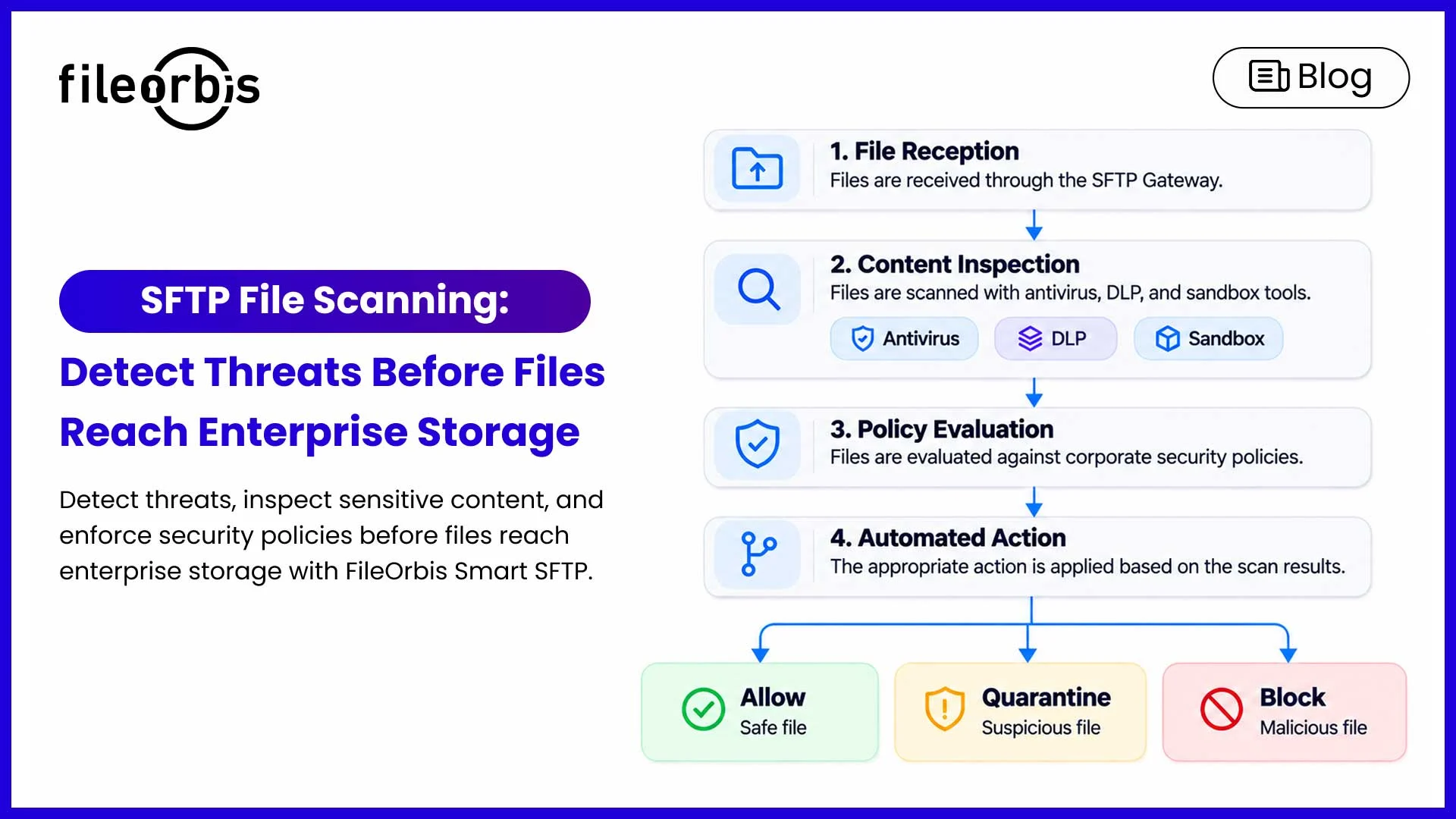
A secure SFTP file scanning workflow typically consists of four stages:
- File Reception: An SFTP gateway receives files from applications, authorized users, or external systems.
- Content Inspection: Security engines examine files for malware, sensitive information, suspicious behavior, or prohibited formats.
- Policy Evaluation: Configured rules determine whether files meet corporate security requirements.
- Automated Action: Files are permitted, quarantined, blocked, or subjected to additional controls.
Inspection takes place at a trusted endpoint or gateway where file content can be accessed securely.
SFTP File Scanning Best Practices
To strengthen enterprise file transfer security, organizations should:
- Apply risk-based scanning policies based on content sensitivity file types, , and transfer destinations.
- Inspect inbound and outbound transfers according to their security requirements.
- Quarantine suspicious files before they reach production environments.
- Integrate existing security tools instead of managing disconnected inspection systems.
- Maintain detailed audit records to support investigations and regulatory requirements.
How FileOrbis Helps
FileOrbis Smart SFTP combines secure file exchange with content-aware inspection and centralized policy enforcement.
It enables organizations to apply security controls into existing SFTP workflows and integrate with their enterprise security infrastructure.
Key capabilities include:
- Real-Time Threat Inspection: Scan transferred files using antivirus and sandbox technologies.
- Content-Aware DLP: Identify sensitive information and enforce data protection policies.
- Advanced Content Protection: Integrate Content Disarm and Reconstruction (CDR) to reduce file-based threats.
- ICAP Integration: Connect existing sandbox, antivirus, DLP, and CDR solutions.
- Automated Remediation: Quarantine, block, or encrypt files according to predefined rules.
- Centralized Audit Trails: Monitor file transfers, policy enforcement activities, and inspection outcomes.
FileOrbis also supports file exchange across existing enterprise storage environments, including file servers, NAS, SharePoint, S3, Azure Blob, and OneDrive.
This allows organizations to modernize SFTP security without replacing their storage infrastructure or migrating enterprise data.
In Summary
SFTP file scanning helps organizations move beyond transport-level encryption by introducing security inspection and automated controls into file exchange workflows.
With FileOrbis Smart SFTP, enterprises can strengthen threat prevention, protect sensitive content, and maintain visibility into file transfers without disrupting existing storage environments.
Discover FileOrbis Smart SFTP and secure your enterprise file transfer workflows.
Frequently Asked Questions
- Does SFTP automatically scan files for malware?
No. Standard SFTP encrypts data during transmission but does not include built-in malware inspection. Additional scanning technologies are required.
- Can SFTP file scanning be integrated with existing security tools?
Yes. SFTP gateways can integrate with sandboxing, antivirus, DLP, and other security solutions through supported interfaces such as ICAP.
- Can FileOrbis Smart SFTP secure automated file transfers?
Yes. FileOrbis Smart SFTP helps automated, policy-driven file exchange workflows, enabling organizations to apply content inspection and security controls to recurring transfers.

Hammam Abunaser
Sales Director, MEA
Subscribe to our Newsletter
About FileOrbis
Aiming to manage the user and file relationship within an institutional framework, FileOrbis is constantly being developed in order to meet different industry and customer needs in terms of file management and sharing. Since 2018, FileOrbis continues to be developed with the excitement of the first day. FileOrbis focuses on high security, rich integration, ease of use and integrated management criteria.