Microsoft 365 Content Governance: How to Secure Sharing and Sensitive Data
Microsoft 365 enables collaboration across OneDrive, SharePoint, and Teams. However, Microsoft 365 content governance becomes increasingly important as employees share sensitive information internally and with external partners.
Traditional file permissions determine who can access a document, but they don’t always address whether its content should be shared.
Effective content governance helps organizations close this gap by applying security policies based on file sensitivity, sharing context, and organizational requirements.
What is Microsoft 365 Content Governance?
Microsoft 365 content governance is the process of managing how enterprise information is accessed, protected, and shared across Microsoft 365 environments.
It combines several security practices:
- Sensitive Data Identification: Identifying confidential information in enterprise documents.
- Policy Enforcement: Applying security requirements based on content sensitivity and business context.
- Access and Sharing Governance: Controlling how users collaborate with internal and external recipients.
- Audit and Monitoring: Maintaining visibility into file activity and security decisions.
These practices help organizations protect business information while supporting everyday collaboration.
Why Microsoft 365 Content Governance Matters
Microsoft 365 includes built-in security and compliance capabilities like Microsoft Purview. However, organizations may need additional controls for complex external collaboration scenarios.
Common challenges include:
- Authorized Access, Unauthorized Sharing: Employees may access confidential documents legitimately but share them with recipients who should not receive the information.
- Inconsistent Security Workflows: Manual approvals and disconnected security tools can delay collaboration and create opportunities for policy violations.
- External Collaboration Risks: Shared links can remain accessible longer than necessary or lack appropriate recipient restrictions.
Addressing these challenges requires security decisions that consider both document content and sharing conditions.
Key Security Controls for Microsoft 365 Content Governance
- Content-Aware Sharing and Approvals
Before employees share sensitive documents, organizations should inspect their contents and determine whether additional authorization is necessary.
Content-aware governance supports:
- Policy-based approval workflows for sensitive documents.
- Identification of personal, confidential, and financial information.
- Sharing decisions based on content classification.
- Granular External Access Restrictions
Organizations can apply different security conditions depending on the sensitivity of shared information.
Key controls include:
- Download limits and link expiration.
- Geographic and IP-based access restrictions.
- Dynamic watermarking and encryption.
These measures help reduce unnecessary exposure after files leave internal collaboration workflows.
- Secure File Upload Protection
External uploads can introduce malicious content into Microsoft 365 environments.
Security measures such as Content Disarm and Reconstruction (CDR), antivirus scanning, and sandbox analysis help organizations inspect incoming files before they enter business workflows.
- Audit Visibility and Monitoring
Centralized records of file-sharing activities, approval decisions, and security events help review policy enforcement, teams investigate incidents, and support compliance requirements.
How FileOrbis Helps
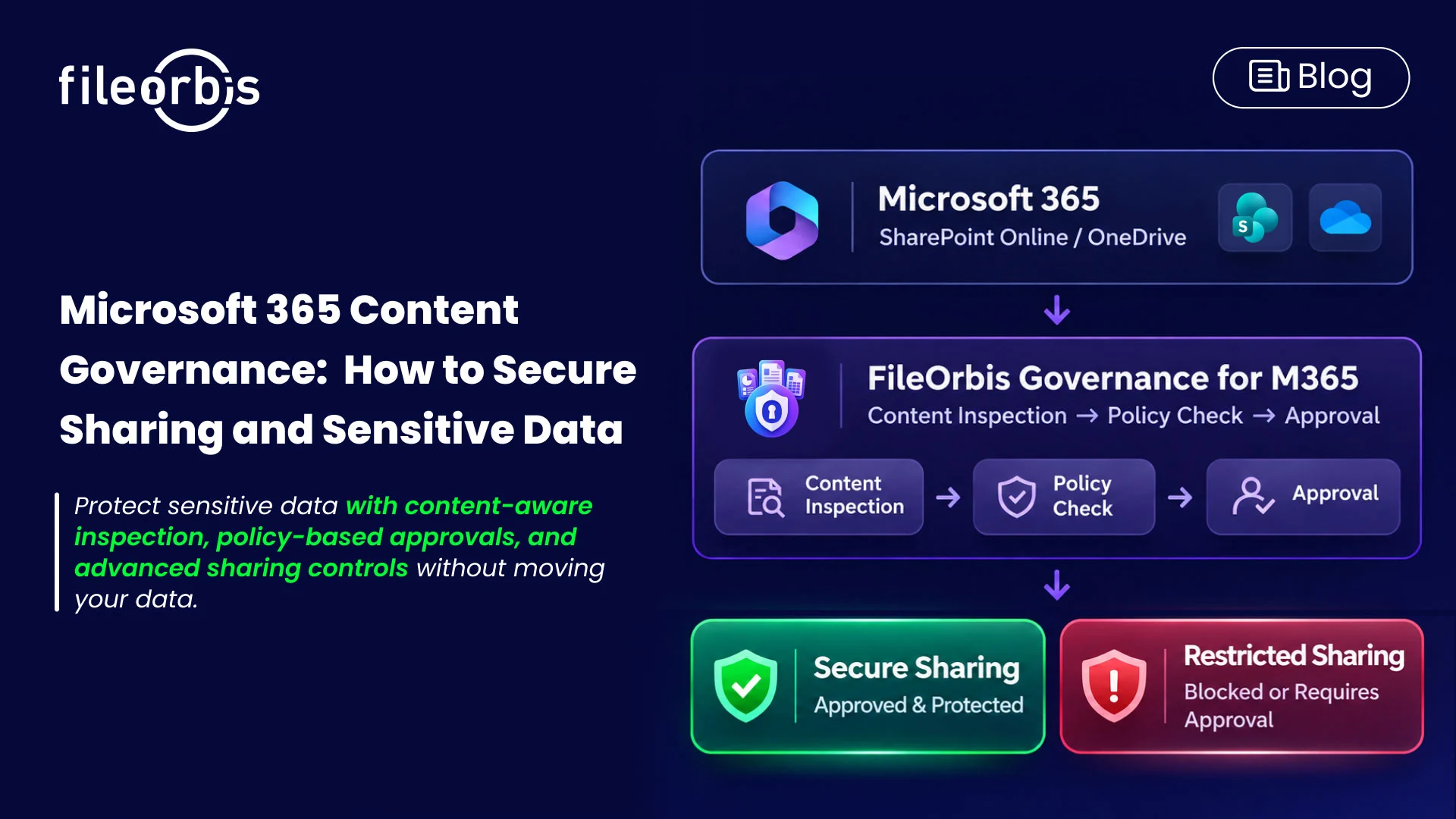
FileOrbis extends Microsoft 365 security through Governance for M365, an add-in integrated with OneDrive and SharePoint Online.
Employees can access advanced sharing capabilities directly from familiar right-click menus, reducing the need to switch between applications.
FileOrbis provides:
- Smart Approval Workflows: Request authorization through email or Microsoft Teams.
- Real-Time Content Inspection: Evaluate documents before external sharing.
- Advanced Sharing Protection: Apply geo-fencing, download limits, IP whitelisting, PGP encryption, expiration dates, and dynamic watermarking.
- Secure Upload Inspection: Use CDR, antivirus, and sandbox technologies to inspect incoming content.
- Smart SFTP Connectivity: Support controlled file exchange between Microsoft 365 and SFTP environments.
- SIEM Integration: Connect sharing and security events to centralized monitoring systems.
FileOrbis complements native Microsoft 365 capabilities without requiring organizations to migrate or duplicate existing data.
In Summary
Effective Microsoft 365 content governance goes beyond traditional file permissions. It helps organizations evaluate sensitive content, enforce appropriate sharing conditions, and maintain visibility across collaboration activities.
By integrating these controls into OneDrive and SharePoint Online, FileOrbis helps enterprises strengthen data protection while preserving familiar Microsoft 365 workflows.
Explore FileOrbis Governance for M365 to strengthen Microsoft 365 content governance with content-aware security and controlled file sharing.
Frequently Asked Questions
- What is the difference between Microsoft 365 content governance and access management?
Access management determines who can open or modify files. Content governance also considers information sensitivity, external access conditions, sharing policies, and control requirements.
- How can organizations secure external file sharing in Microsoft 365?
Organizations can combine content inspection, encryption, restricted sharing links, approval workflows, and security monitoring to reduce unauthorized disclosure.
- Does FileOrbis require data migration to govern Microsoft 365 content?
No. FileOrbis Governance for M365 integrates with existing SharePoint Online and OneDrive environments, adding content-aware sharing controls without requiring data migration.

Emre Demiray
Founder – FileOrbis
Subscribe to our Newsletter
About FileOrbis
Aiming to manage the user and file relationship within an institutional framework, FileOrbis is constantly being developed in order to meet different industry and customer needs in terms of file management and sharing. Since 2018, FileOrbis continues to be developed with the excitement of the first day. FileOrbis focuses on high security, rich integration, ease of use and integrated management criteria.