
Microsoft 365 Data Security: How to Protect Sensitive Files Across M365
Microsoft 365 data security is essential for protecting sensitive information across SharePoint, Microsoft Teams, and OneDrive. As employees exchange documents across these environments, managing file access and preventing unauthorized disclosure becomes increasingly complex.
Effective data protection goes beyond traditional access permissions. Organizations should understand what their files contain, control how information is shared, and maintain visibility into sensitive data.
What is Microsoft 365 Data Security?
Microsoft 365 data security involves protecting business information accessed, stored, and shared through Microsoft 365 applications.
It brings together several security disciplines:
- Data Classification: Identify sensitive information within enterprise documents.
- Access Governance: Manage file permissions and reduce unnecessary access.
- Secure Collaboration: Appl appropriate controls when sharing files internally or externally.
- Data Loss Prevention (DLP): Detect and restrict potentially risky information sharing activities.
- Audit Monitoring: Monitor security-related file activity and policy enforcement.
Together, these measures help organizations protect confidential information while maintaining collaborative productivity.
Common Microsoft 365 Data Security Risks
Excessive File Permissions
Inherited permissions, outdated access rights, and changing employee responsibilities can leave SharePoint and OneDrive files accessible to more users than necessary.
Unclassified Sensitive Files
Contracts, employee records, and financial reports may contain regulated or confidential information. Without content visibility, organizations may fail to apply appropriate protection.
Uncontrolled External Sharing
Sharing links may expose confidential documents when recipients have unnecessary download privileges or access remains active longer than intended.
Inconsistent Governance Across Repositories
Organizations that use Microsoft 365 with on-premises file servers and other storage systems may face challenges in maintaining consistent file security policies and controls.
Malicious File Uploads
Files received from external users can introduce malware or other threats into collaboration environments, making incoming content inspection an important security consideration.
Essential Microsoft 365 Data Security Controls
To address these risks, organizations should establish a security approach that combines access restrictions, content inspection, and continuous monitoring.
Key controls include:
- Content-Aware Protection: Inspect sensitive information before files are shared.
- Risk-Based Sharing Policies: Apply expiration dates, download restrictions, and approval requirements based on file sensitivity.
- Least-Privilege Access: Review permissions and remove unnecessary access rights.
- Threat Inspection: Scan externally uploaded files before they enter trusted workflows.
- Audit Logging: Record file-sharing activities and security events for investigation and compliance oversight.
Microsoft Purview provides native data classification, DLP, and information protection capabilities. Organizations with more specific file-sharing requirements can extend these controls through additional management technologies.
How FileOrbis Helps
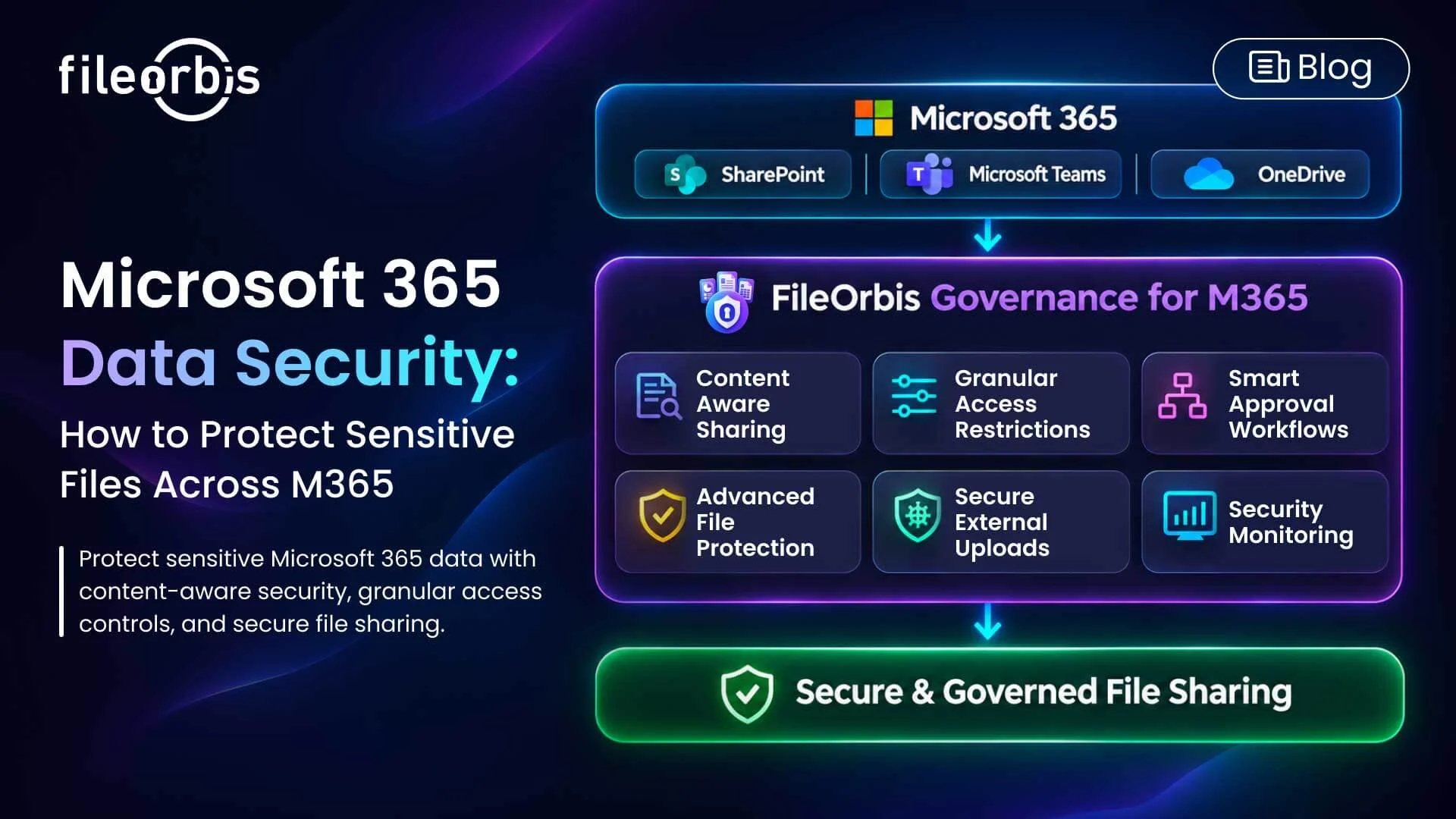
FileOrbis Governance for M365 extends content-aware security and controlled file-sharing capabilities within SharePoint and OneDrive.
Its integration allows employees to apply additional protection through familiar Microsoft 365 workflows without migrating existing files.
FileOrbis provides:
- Content-Aware Sharing: Inspect document content and enforce security policies before external distribution.
- Granular Access Restrictions: Apply geographic controls, download limits, IP restrictions, and access expiration.
- Smart Approval Workflows: Route sensitive sharing requests through configurable approval processes.
- Advanced File Protection: Use PGP encryption and dynamic watermarking to protect shared documents.
- Secure External Uploads: Combine Content Disarm and Reconstruction (CDR), antivirus scanning, and sandbox analysis.
- Security Monitoring Integration: Maintain audit trails and forward relevant events to SIEM platforms.
These capabilities complement Microsoft Purview by adding file-sharing controls and approval workflows to existing Microsoft 365 security investments.
Learn more about FileOrbis Governance for M365.
Best Practices for Microsoft 365 Data Protection
Technology alone cannot eliminate file security risks. Organizations also need consistent operational practices.
To strengthen Microsoft 365 data protection:
- Establish clear ownership for sensitive documents and external collaboration policies.
- Align protection levels with data sensitivity rather than applying identical restrictions to every file.
- Review guest access periodically to identify users who no longer require access.
- Monitor policy effectiveness and adjust controls as collaboration requirements change.
These practices help security and IT teams maintain effective protection without unnecessarily disrupting business workflows.
In Summary
Effective Microsoft 365 data security requires more than securing individual applications. Organizations should understand sensitive file content, manage access appropriately, and control information sharing activities.
Combining Microsoft 365’s native capabilities with content-aware governance helps organizations reduce exposure risks while supporting secure collaboration.
Frequently Asked Questions
What are the main security risks in Microsoft 365?
The primary risks include excessive file permissions, unclassified sensitive information, uncontrolled external sharing, malicious uploads, and inconsistent governance across storage environments.
Does Microsoft 365 include data loss prevention capabilities?
Yes. Microsoft Purview provides DLP capabilities that help organizations identify sensitive information and apply protection policies across supported Microsoft 365 services.
How does FileOrbis help Microsoft 365 data security?
FileOrbis Governance for M365 complements native Microsoft 365 security with content-aware sharing, approval workflows, file protection, granular access restrictions, and secure upload inspection within SharePoint and OneDrive.

Gamze Mat
Product Manager
Subscribe to our Newsletter
About FileOrbis
Aiming to manage the user and file relationship within an institutional framework, FileOrbis is constantly being developed in order to meet different industry and customer needs in terms of file management and sharing. Since 2018, FileOrbis continues to be developed with the excitement of the first day. FileOrbis focuses on high security, rich integration, ease of use and integrated management criteria.